

Help a diner decide whether to visit
A small food-truck page can do a useful job before it takes an order: show the right stop, entrance, hours and menu option. Start there if those are the questions your current page leaves unanswered. Keep your existing page if it already answers them clearly.
This pilot is for one operator publishing a menu and announced stops. If your essential task is paid ordering, live vehicle tracking or connected stock counts, define and test that requirement separately before choosing this scope.
Fictional public-menu example
Example Lunch Truck
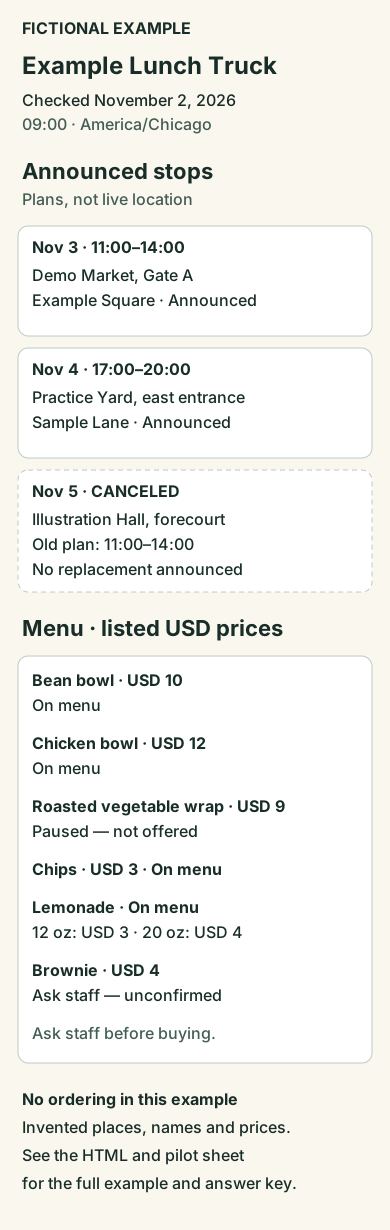
Information checkpoint: November 2, 2026, 09:00 America/Chicago. These places, names and prices are invented.
Announced stops
Plans entered by the operator, not live location.
11:00–14:00 America/Chicago
Demo Market, Gate A, Example Square
17:00–20:00 America/Chicago
Practice Yard, east entrance, Sample Lane
11:00–14:00 America/Chicago
Illustration Hall, forecourt
No replacement announced. Do not use this row as a planned visit.
Ask the serving staff before buying. This example has no working order or contact channel.
Listed USD prices are not a checkout total or tax/fee quote. No dietary or allergen assurance is given by this fictional example.
Teaching section — answer key
Can a diner answer these four questions?
Read the menu and stops first, then open each expected answer. A correct answer here does not mean a reader test has been run.
Where and when is the announced dinner stop on November 4?
Practice Yard, east entrance, Sample Lane; November 4, 17:00–20:00 America/Chicago. This is an announced plan, not a current GPS position.
Can I plan a November 5 lunch visit from this schedule?
No announced operating stop is listed for November 5. The Illustration Hall stop is canceled and no replacement is announced.
What listed price belongs to a 20 oz lemonade?
USD 4 for 20 oz. USD 3 belongs to the separate 12 oz choice. This is a listed price, not a checkout total.
Can this page promise me a wrap and a brownie?
No. The roasted vegetable wrap is paused; brownie availability is unconfirmed. Ask staff before buying. This page takes no orders.
Try your own one-week pilot
The editable sheet includes this filled example, blank menu/stop rows and a place to record a reader's actual answers.
Open the fictional menu overview
Try four decisions with one week's information
Download the completed and blank pilot sheet. Its invented Example Lunch Truck has six menu items and three stop records. All names, places and prices are fictional.
Give a reader the menu and stops before revealing the sheet's answer key. Record their answers on a phone. A wrong or missing answer identifies a specific page repair; a written answer key is not a completed reader test.
Keep a canceled stop visible, place each option beside its own price, and show an information-checkpoint date. Replace the fictional contact instruction with a maintained operator contact route. The example's four on-menu items are listed offerings, not a stock count or a promise that an order can be fulfilled.
Choose a starting point that fits
The Foodtruck template offers a public menu-and-schedule starting point. Its public preview showed menu items with prices and announced route rows during our October 14 review. Inspect those screens against your needs; that observation does not establish operator editing, ordering, live location or saved changes. Replace all sample truck information with your own verified information.
You can also build the smaller public-information scope from a brief. Start with the reader's four decisions rather than adding every feature of a food-ordering app.
Bring the pilot to Overskill
Open the Overskill brief builder. Set the audience to diners choosing a stop, the outcome to finding a dated stop and the right menu option, and the records to menu items, named price options, announced stops, visible cancellations and the information-checkpoint date. Choose public reading with owner-only editing, then test that rule in the app you build.
Edit the input fields, review the generated brief, then choose Start build. Supply your menu, stops and four expected answers separately: the link does not import the pilot sheet. The account's normal building access and credits apply.