

A public page should download what its reader needs to finish the job. Start with the controls people use, measure the page, then remove unrelated dependencies and repeat those checks. A smaller file is useful only if the page still works.
We tested Overskill’s own public learning index at /learn, part of our Rails platform website—not an app generated by Overskill. Giving signed-out readers a focused JavaScript entry and stylesheet reduced those two compressed response bodies from 1,888,949 to 122,104 bytes. That is 93.5% smaller for those resources, not the whole page or a claim of 93.5% faster loading.
A smaller download. A measured result.
Overskill’s public learning index · Local measurements, September 8, 2026
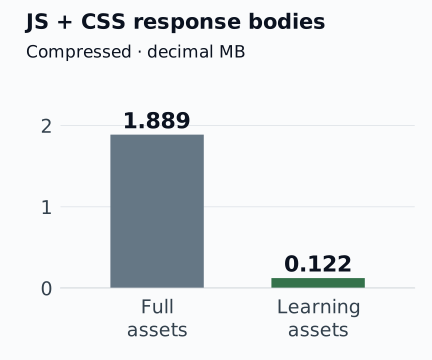
Two response bodies, measured locally. HTML, fonts, images, video and response headers are outside this comparison.
Open full-size chart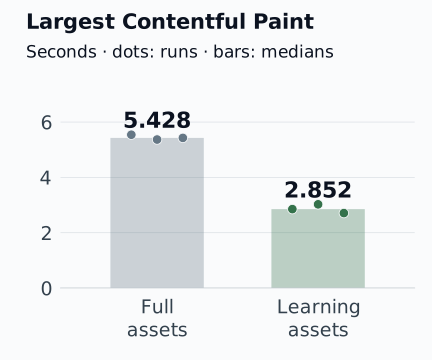
Every local load is shown. Dots are observations; bars show medians. These are not production or real-user timings.
Open full-size chartStart with the reader’s job
Our reader needed to open the menu, choose a theme, make and copy an app brief, and follow guide links. The full builder had many other responsibilities. Sending its complete assets to this reading page meant downloading code and styles unrelated to those tasks.
We listed the required controls and their dependencies before separating the assets. The focused stylesheet kept the original order of the rules it needed. Signed-in learning pages retained the full application assets, including their account controls. Unrelated routes kept their existing behavior.
Moving between a focused learning page and a full application page needed a complete document reload. Navigation between learning guides could retain its existing behavior. That boundary was part of the change to test, not an assumption that a smaller bundle would handle everything.
Read the measurements in context
Largest Contentful Paint, or LCP, records when the largest visible content element appears. In all six traces, that element was the same introductory paragraph. Three local loads per version produced these results:
Scroll horizontally to compare all columns.
| Local measurement | Full assets | Learning assets |
|---|---|---|
| Compressed JS + CSS body bytes | 1,888,949 | 122,104 |
| LCP, run 1 | 5.543 s | 2.852 s |
| LCP, run 2 | 5.369 s | 3.026 s |
| LCP, run 3 | 5.428 s | 2.709 s |
| Median LCP | 5.428 s | 2.852 s |
| CLS, rounded to two decimals, each run | 0.03 | 0.03 |
Download all six observations as CSV or download the measurement method. CLS measures layout movement; the unrounded recorded sum was approximately 0.02536, not zero.
The loads ran on September 8, 2026, using HeadlessChrome 152, a 390 × 844 viewport, device-pixel ratio 1, Slow 4G emulation and 4× CPU throttling. Each used a fresh browser context. All three baseline loads came before the three candidate loads; they were not randomized or interleaved.
Both versions used the same warmed, guarded local test-runtime configuration, with its configured JavaScript compressor and gzip responses. The runtime restarted between versions. The production-only tracking pixel was absent. Body-byte totals exclude HTML, fonts, images, video and response headers; separately compressed files can have different sizes.
Preserve the useful behavior
We also compared styles and geometry across the learning index and the five guides that existed then: two widths, two themes, 24 comparisons. The checked properties showed no differences, horizontal overflow or unloaded images. Those were same-page stylesheet swaps with animations frozen, not 24 performance tests or an exhaustive accessibility review.
Separate browser checks exercised the menu, theme persistence, brief selection and copying, guide contents, and navigation across the asset boundary. Use the same approach for your page: test what someone can accomplish as well as what their browser downloads.
Copy a focused performance brief
Replace the bracketed details. Keep the first change small enough to review. You can also download this brief.
Improve [one public page] for [the reader’s main task].
First list its controls, required assets, and signed-in differences.
Record the current page, viewport, browser, network and CPU settings.
Measure selected asset bodies separately from whole-page transfer.

Propose one dependency change and explain what behavior it preserves.
Keep content, account gates, tracking and required controls intact.
Do not change payments, create accounts or send external messages.

Repeat comparable loads and retain every result, including slower runs.
Check menu, theme, keyboard access, copy/download, and navigation both ways.
Report observed differences, failures, setup and anything not tested.
Do not claim a production, search or signup improvement from local results.
Before accepting the change, use this checklist:
- Can a new reader finish the original task on a phone and with a keyboard?
- Do menu, theme, links, copy and download still work, including return navigation?
- Are signed-in controls and account gates preserved?
- Are the test conditions and every observation recorded, with failures visible?
- Can you explain what was measured without calling two resources the whole page?
Apply the method, not the percentage
At the initial September 9 rollout, the index and five guides selected the focused assets. More content followed. Production artifact sizes differed from the local files, so these numbers remain a historical local comparison.
This small sequential sample does not establish real-user Core Web Vitals, interaction responsiveness, generated-app performance, search rankings, AI citations or registrations. The useful result is a reviewable method: define the page’s job, measure a specific change and verify that the job still works.
Use the launch checklist to test the rest of your app, or adapt your next change with the brief builder.