

A customer asks whether a notification arrived. Your app has a successful request response, a delayed webhook and a second copy of an earlier event. Which label should it show?
This is a Part 4 test for an app you are preparing in Overskill. Use four fictional notifications to decide what each status means, retain the evidence behind it and identify when the honest answer is unknown or review needed. The local replay sends no email and connects to no provider. It does not test an Overskill integration, inbox placement or server permissions.
Start at receipt 4 in the replay below. Then advance through the duplicate receipt, later delivery report and older event that arrives last. Download a selected replay to inspect the exact message IDs, event times and counts. Download the worksheet and answer key to repeat the exercise with another reviewer; download the fictional journal if you want to inspect its source.
Replay the email evidence
Fictional local exercise · no email sends
Four request responses are already accepted. Inspect what later provider events support. No accounts, addresses, tracking or network connection are used. Your selection stays in this page only; leaving or reloading resets it.
Message ledger
Scroll the table horizontally when needed. Event times are UTC. “Server delivery reported” does not prove inbox placement or human reading.
Received event journal
Five app attempts, four notifications
A4a timed out. The fictional retry A4b used the same key and payload and returned PM4. This stipulated response is not a general retry guarantee; no retry occurs here.
Keep the evidence
Prepare one status screen in Overskill
Prepare a brief from the current replay, then edit and review it. Preparing another brief replaces your text; changing the replay alone keeps your edits. Reset or leaving the page clears them. Start build carries this text into Overskill, without attaching the journal. Supply that separately. Normal account access and credits apply.
Name the evidence before naming the status
“Sent” is not a universal promise. Resend's event reference describes email.sent as a successful API request after which delivery will be attempted. Its email.delivered event means the recipient's mail server accepted the email. Those are different facts. Use your chosen provider's current definitions before mapping its events to app labels. Resend event types
Scroll horizontally to compare all columns.
| Evidence available | Suggested label for this exercise | What remains unknown |
|---|---|---|
| Local app queue record only | Queued in this app | Whether the provider accepted a request |
| Accepted request; no provider event | Delivery unknown | Recipient-server delivery |
Provider sent event |
Send accepted | Recipient-server delivery |
| Temporary delivery delay | Delayed | Whether delivery will later succeed |
| Provider delivery report | Server delivery reported | Inbox placement, human reading and completion of the customer's task |
| Provider rejection or send failure | Rejected or Send failed | Whether another attempt would be appropriate |
| Missing or incompatible evidence | Review needed | A definitive outcome |
The replay begins after all four requests have an accepted response. Its local queue timestamps are background records, not a claim that Resend calls ordinary transactional requests “queued.” Resend's dashboard uses that status for broadcasts and batches. Email status definitions
An open signal belongs beside the status, not above it. Image loading, privacy features and automated scanning can affect open tracking. The exercise retains the signal and continues to show human reading as unknown. It neither enables tracking nor recommends collecting additional recipient data. Resend's explanation of open-rate limits
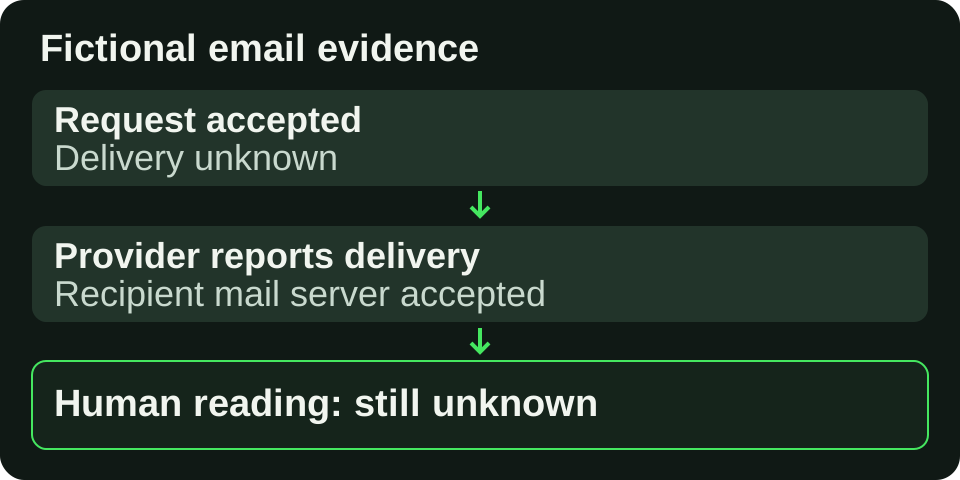
Original planning diagram. The three labels describe different evidence; none proves that a person read the message.
Open full-size imageKeep four notifications separate from five attempts
Each fictional business action BA1–BA4 has one notification M1–M4 and one synthetic provider message PM1–PM4. All times in the journal are November 4, 2026, UTC. The envelope and IDs are an explanatory format, not actual Resend webhook payloads.
M4 has two API attempts. A4a times out; A4b uses the same declared idempotency key and payload identity and returns PM4. The example stipulates that response. It does not establish a safe retry for your app. Both attempts remain visible, and M4 remains one notification with an unknown delivery outcome.
Request retry and event replay need separate rules. Resend currently retains send-request idempotency keys for 24 hours and rejects reuse with a different payload. Separately, a webhook may be retried or manually replayed. Receiving the same event again does not mean a second email was sent. Request idempotency, webhook retries and replays
In this exercise, deduplication first finds provider + event ID, then checks the immutable event content. A new receipt of the same event is retained as a duplicate. Reusing that ID with different content stops the replay with an error; it does not overwrite evidence. This local rule is not webhook authentication.
Walk through the late evidence
At receipt 4, each of four notifications is in a different state:
Scroll horizontally to compare all columns.
| Notification | Evidence retained | Result |
|---|---|---|
| M1 / PM1 | E1 sent; E2 delivered | Server delivery reported |
| M2 / PM2 | E3 bounced | Rejected |
| M3 / PM3 | E4 delivery delayed | Delayed |
| M4 / PM4 | Accepted request; no event | Delivery unknown |
Receipt 5 repeats E2. There are now five receipts but still four unique events and four notifications. The status counts do not change.
Receipt 6 reports PM3 delivered at 10:08, received at 10:09. Receipt 7 brings an older PM3 sent event: its event time is 10:01, although it was received at 10:10. Keep both clocks. Under this exercise's policy, a progress event cannot erase a supported outcome. M3 stays at Server delivery reported.
Receipt 8 adds an M1 open signal. The final main result is two server-delivery reports, one rejection and one unknown, with eight receipts, seven unique events and one duplicate. It is a count of these four fictional records, not a delivery-performance measurement.
Stop when the evidence needs review
Switch to the conflicting-outcome scenario. An additional bounce report for PM1 follows its delivery report. This exercise conservatively marks M1 Review needed and retains both outcomes. It does not claim that such a sequence is impossible or prescribe precedence for every provider. A real implementation needs the provider's semantics and an authorized investigation.
In the missing-time scenario, PM4 has a sent event without an event timestamp. The message becomes Review needed. The model also refuses to invent an order between different progress types at exactly the same event time. Unknown types stay visible as review cases; they never silently become success.
These are stop conditions. Do not turn missing evidence into a green badge or add a resend button to conceal the uncertainty. For the separate problem of a user retrying an interrupted submission, use Test an AI app when requests are interrupted.
Build one testable status screen
Use the aid's prepared brief to describe one staff screen: four fictional messages, their attempts and received events, the status copy, and the unknown/review rules. Raw provider evidence and exports belong to authorized assigned staff. A recipient view, if added later, must expose only that authenticated recipient's permitted status. Those server-enforced restrictions are requirements to test, not features proven by this page.
Choose Prepare brief from this replay in the aid, edit its brief and review the complete text before Start build. The native form carries that text into Overskill; it does not attach the journal. Supply the fictional setup separately. Changing the replay keeps your edited brief until you explicitly prepare another one. Copy brief is a secondary option when you are documenting the requirement before building. Normal account access and credits apply.
Keep the first prototype disconnected from email. Proceed to an authorized provider test only after request identity, authenticated event handling, access restrictions and status meanings have been checked. If the provider mapping or event evidence is still uncertain, keep that outcome unknown and hold the connection. A working local replay is a useful specification; it is not delivery proof.