

An AI-built app is ready for a small launch when its main journey works for a new user, private data stays private, and failures have a clear recovery path. Passing a visual review is one part of that decision. Saving, access, and external services need their own evidence.
Use this checklist with sample data first. Mark each item Pass, Fail, or Not applicable, and record what you actually observed. An item you could not test remains Unverified.
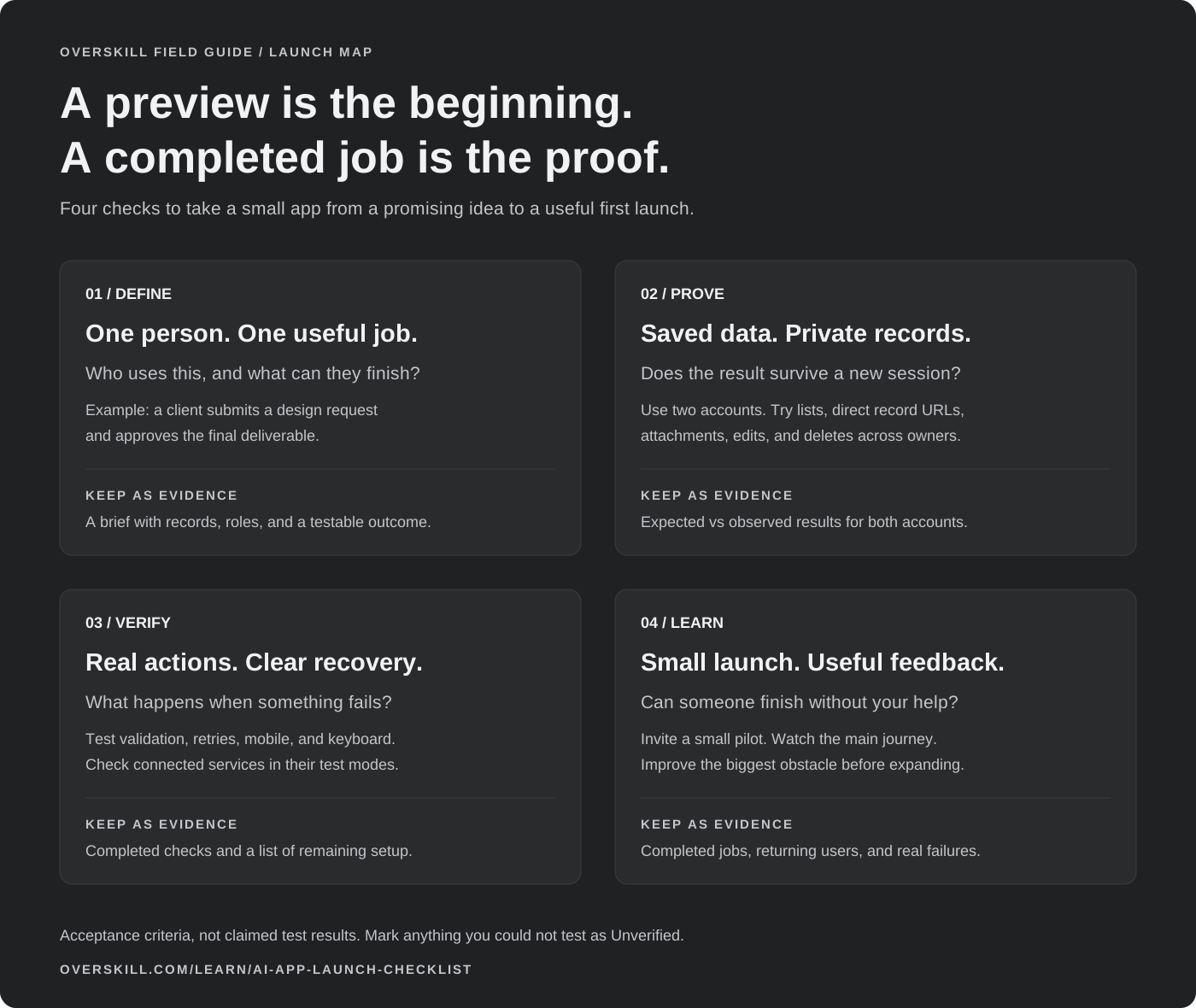
Open the shareable launch map or download the editable test worksheet. Both describe what to check, not results already achieved.
1. Complete the journey as a new user
Open the published app in a fresh browser session. Follow its invitation or signup path, complete the main action, and return later. The result should still be there after refresh and after signing in again.
- Check the first empty state; it should explain the next useful action.
- Test required fields, a long input, a duplicate submission, and a slow connection.
- Make sure success means the record or external action actually completed.
- Confirm that errors preserve the user's work where possible and offer a useful retry.
If visitors use the app inside another website, check the embed on its real host page. Record the allowed host, the relevant publish and the visitor task separately.
Write a one-sentence acceptance test: “A new client submits a request, sees it after refreshing, and can find the studio's response.” That is stronger evidence than “the dashboard looks good.”
A real starting point · Bookslot
Turn a booking screen into a launch test.
Bookslot gives you a concrete journey to work through: choose a service, choose a person and time, then enter the booking details. Use each step to write a check you can repeat.
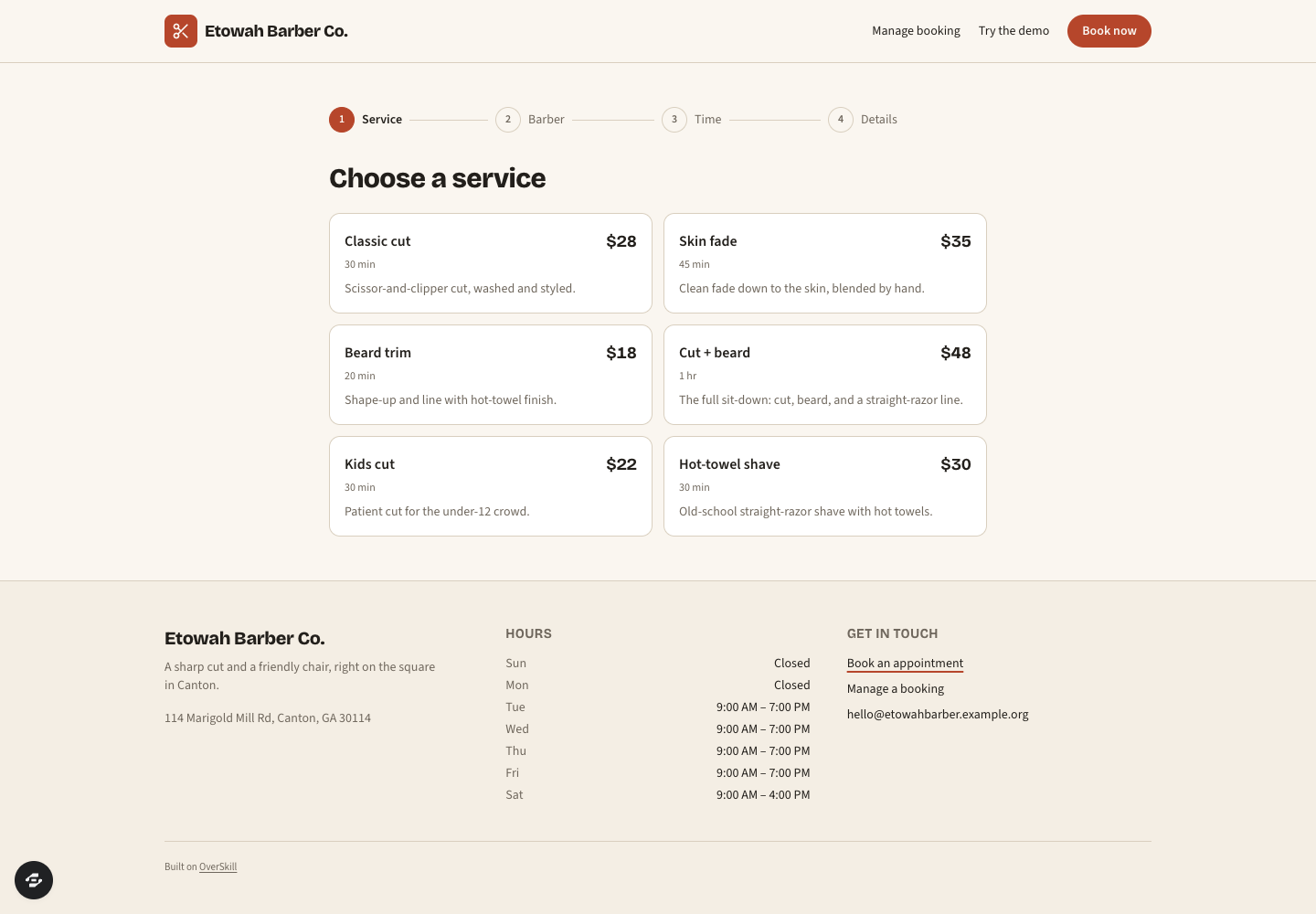
Bookslot’s public service-selection screen makes duration and price visible before the next step. Services and prices are sample content; no booking was submitted for this guide.
Preview captured · Open live preview · View full-size imageWhat to inspect
- Finish the whole bookingChoose a service and time, then verify the confirmation and return journey with sample details.
- Try the awkward casesTest an occupied time slot, a reschedule, and a canceled booking. Record the result of each.
- Match the payment modelThe catalog describes in-person payment. If you need online payment, configure and test that separately.
The public remix page continues through signup or sign-in. Check your account access and credits before creating a copy. Current plans and credits.
For a complete appointment example, use the service-booking guide and test worksheet to check availability, competing requests, cancellation, and rescheduling.
2. Test ownership and access with two accounts
Create two test accounts with different data. Use account B to try opening account A's record URL. Repeat for files, search, edits, and deletes. Check signed-out access as well.
The server should reject unauthorized reads and writes. Hidden buttons and filtered lists are not sufficient proof. If your app has team roles, test a regular member and an administrator separately. Document which information is intentionally public.
Never place private keys in frontend code. Confirm the intended server-side configuration and the minimum access needed by each connection. Review platform guidance in Trust & security, but assess your generated app's own access rules too.
3. Verify payments and connected services
Use supported test facilities before charging real money or messaging customers. Check a successful payment, a canceled attempt, a duplicate callback, and an interrupted browser return. Confirm the resulting access or entitlement in the app, not merely the payment button's appearance.
For email and integrations, verify the sending identity, connected account, intended recipient, and error behavior. A mock response or unconfigured placeholder is not a live integration. Keep a list of setup that must be completed before launch.
Read current pricing and usage limits. Distinguish building credits, app usage, storage, and any external-service costs relevant to your workflow. Do not promise customers unlimited use based on a single marketing phrase.
4. Use it on a phone and with a keyboard
Check a narrow viewport, a long page, a software keyboard, and the most important form. Buttons should remain reachable and text should not require horizontal scrolling. Distinguish a home-screen installable web app from a native App Store app when describing what you ship.
Navigate with the keyboard. Look for visible focus, meaningful labels, sensible headings, and errors that do not depend on color alone. Supply text alternatives for useful images and captions or transcripts for instructional video. Automated checks help, but still complete the main journey yourself.
For a slower public page, use the measured learning-page example and performance brief. Identify what the reader needs, record comparable loads, and preserve the useful controls when changing its assets. Its local measurements are a method to learn from, not a speed guarantee for your app.
5. Make the public pages understandable
For pages you want search engines to discover, write a distinct title, a useful description, and one clear main heading. Explain who the app helps and how it works in visible HTML. Use crawlable links to important pages, and make sure the canonical URL names the intended public address.
Only include public, canonical pages in a sitemap. Private workspaces and account screens are not discovery content. Robots instructions are not access control; private records still require authorization.
Add structured data only when it truthfully describes visible content. Do not create a rating, review count, price, or video metadata to fill a schema field. Google says normal SEO and original, useful content remain central to its AI experiences; it does not require a special AI text file. See Google's current AI optimization guidance.
6. Make recovery and ownership concrete
Know how to restore a working version and who handles a failed integration. Verify what a code export contains; code, database records, uploaded files, secrets, and domain configuration are separate parts of a migration.
Before someone else maintains or operates the app, rehearse one recipient task. Choose between builder access, the generated app and a limited review presentation, then record what the recipient can actually do.
Have a support contact and an understandable description of data use. Remove sample testimonials, fake numbers, unused buttons, and placeholder legal text. If a workflow is still being developed, label its status where a customer will encounter it.
7. Launch to learn, then grow
For a concrete example, see two chiropractic business demos built through MCP. The case separates browser checks, repairs and public demos from the remaining work for a private client rollout.
Start with a small group and one measurable success event: a completed request, a saved plan, a booking, or an approved deliverable. Count new users separately from visits and returning users. Track activation and retention so a traffic spike does not hide a broken first experience.
| What to record | Why it matters |
|---|---|
| New accounts by source | Shows which discovery paths bring people in |
| First useful action completed | Shows whether the promise becomes value |
| Return usage | Shows whether the app is useful again |
| Failures and support requests | Shows where the journey needs repair |
Do not block the launch waiting for every optional feature. Do hold it when the main journey fails, data access is wrong, or a live external action is unverified. Return to the app brief to narrow the scope, or compare starting points if the underlying workflow is a poor fit.