

A box contains 24 wooden craft discs. Four are held for inspection. Before promising an order, the useful number is 20 available pieces—not the 24 physically in the box.
This Part 2 workflow recipe helps you specify a small stock app in Overskill. Use the local calculator to change a fictional movement, explain the resulting balance and take a worked ledger into your build brief. It does not read or change real inventory. Download the worksheet and download the example ledger to check the same case without JavaScript.
Separate what is here from what you can promise
For this example, on hand = available + reserved + held. Reserved pieces are promised to orders but still physically present. Held pieces are present but unavailable pending inspection. Incoming pieces are expected, so they sit outside that sum until received.
Shopify's inventory-state documentation makes a similar distinction between physically held, available, committed, unavailable and incoming quantities. The rules below are our narrower fictional policy; they are not a Shopify connection or a claim that an Overskill app already follows them.
We use one SKU, one location and whole pieces. Reservations are one pooled count, not proof of what a particular order may receive. For individually tracked reusable equipment, use the separate equipment checkout workflow.
Change a movement and inspect its effect
Try the stock ledger
Fictional wooden craft discs, one SKU at one location. Change the counts or a movement to see the full ledger recalculate. This does not change any real stock. Section jumps keep your inputs. Reloading, leaving this guide or resetting clears your changes.
Use whole pieces, 0–1,000,000 for opening counts and 1–1,000,000 per movement. A blank is unknown, not zero. Reserved plus held cannot exceed on hand.
Receipt and inspection are assumptions you supply. A requested return does not add pieces. Reservations are pooled here; this exercise does not check a particular order.
Enable JavaScript to change the example. The worksheet below contains the full static answer key.
- On hand
- 32
- Reserved
- 0
- Held
- 5
- Available
- 27
- Incoming
- 0
Static worked answer: 32 on hand = 27 available + 0 reserved + 5 held. Incoming remains outside this sum.
Scroll the ledger horizontally to inspect every balance.
| Attempt / event | Movement / pieces | Disposition | On hand | Reserved | Held | Incoming | Available |
|---|
Download the worked and blank worksheet · Download the worked ledger CSV
Build from your stock rule
Review and edit the brief before choosing Start build. This form carries only the edited text; it does not import your local ledger or verify any stock. Supply your example separately. Building uses normal account access and credits.
Start with the worked values: 24 on hand, zero reserved, four held and ten incoming. The ledger accepts these seven movements in order:
Scroll horizontally to compare all columns.
| Movement | On hand | Reserved | Held | Incoming | Available |
|---|---|---|---|---|---|
| Opening counts | 24 | 0 | 4 | 10 | 20 |
| Reserve 6 | 24 | 6 | 4 | 10 | 14 |
| Receive 10 usable pieces | 34 | 6 | 4 | 0 | 24 |
| Dispatch 4 reserved pieces | 30 | 2 | 4 | 0 | 24 |
| Cancel the remaining reservation of 2 | 30 | 0 | 4 | 0 | 26 |
| Accept a physical return of 3 into hold | 33 | 0 | 7 | 0 | 26 |
| Release 2 after inspection | 33 | 0 | 5 | 0 | 28 |
| Record 1 lost available piece | 32 | 0 | 5 | 0 | 27 |
Dispatch removes physical pieces and their reservation together. It does not reduce availability a second time. A physical return increases on-hand stock but cannot be promised while it is held. Releasing an inspected piece changes its availability, not its physical presence.
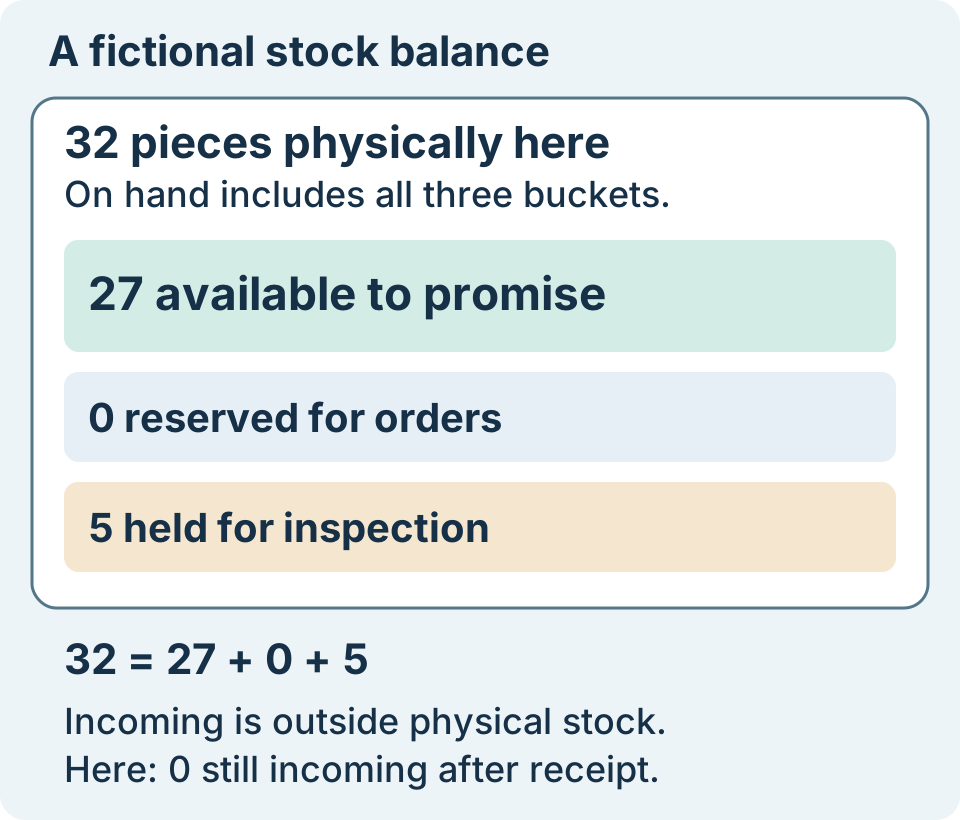
Authored final checkpoint after seven accepted movements. Physical stock and available stock answer different questions.
Open full-size imageNow change the dispatch from four to six. The later cancellation of two no longer has reserved pieces to release, so it is rejected. The accepted movements finish at 25 available. The result keeps the rejected attempt visible; it does not silently count the cancellation or call the entire plan applied.
Keep unknowns and repeated actions visible
Try reserving 28 pieces after the original worked sequence. Only 27 are available, so the new attempt changes nothing. Repeating accepted event EV01 exactly also changes nothing; reusing EV01 for a different quantity is a conflict. Those are two different explanations for an unchanged balance.
Clear a required count. The aid removes the previous result and disables its export. A blank count is unknown, not zero. If the actual stock count, physical receipt or inspection result is unknown, get that evidence before treating a number as available.
The exercise keeps accepted movements and rejected or duplicate attempts in the exported result. It cannot verify a physical count, an order, a return, simultaneous users or a saved inventory system. Reloading or leaving clears your local work; download or copy the visible result first if you need it.
Turn the rule into an Overskill build brief
Open the app brief builder. Describe your SKU and unit, the opening counts, permitted movements, inspection responsibility and what should happen when evidence is missing. Include the expected answers above. The internal-tools starting page offers the broader workflow entry; no stock template or connection is assumed here.
Require authorized staff to change movements and inspection holds. Test direct reads, edits and exports with an unauthorized account before using real records. A hidden button is not a permission check. If you need per-order reservations, multiple locations or partial receipts, add those requirements explicitly and test them separately.
Review the generated brief, edit its input fields and choose Start build. The link imports no ledger; supply your rules and fictional cases separately. Building uses normal account access and credits. Keep purchasing, prices, refunds, accounting and stock-value claims outside this quantity exercise.