


Before you put private client information in an app, test whether the wrong person can open or change a record. Use two client accounts, known sample records and a written permission rule. Check direct links and files as well as the dashboard. A successful sign-in answers who someone is; it does not establish which records they may use.
The useful result is a small set of repeatable checks with expected and observed outcomes. You can give that evidence to a builder, repeat it after a change and decide whether a private pilot is ready. Download the record-access test matrix to work through the exercise.
Write the permission rule before testing
Consider a fictional design studio with two client workspaces: North Workshop and South Studio. Each has one request and one sample attachment. An operator supports North Workshop only. These are test fixtures you create in an app you own or have explicit permission to test.
Write the policy in ordinary language:
A client may read requests and attachments in their own workspace and add a comment. Only assigned operators may change request status. An unassigned operator has no access. Signed-out visitors cannot read private records.
That last detail matters. “Staff can access projects” is too vague if some staff work for different clients. Decide whether administrators have a separate, deliberate exception. The client-portal guide explains the underlying workspace, request and deliverable records.
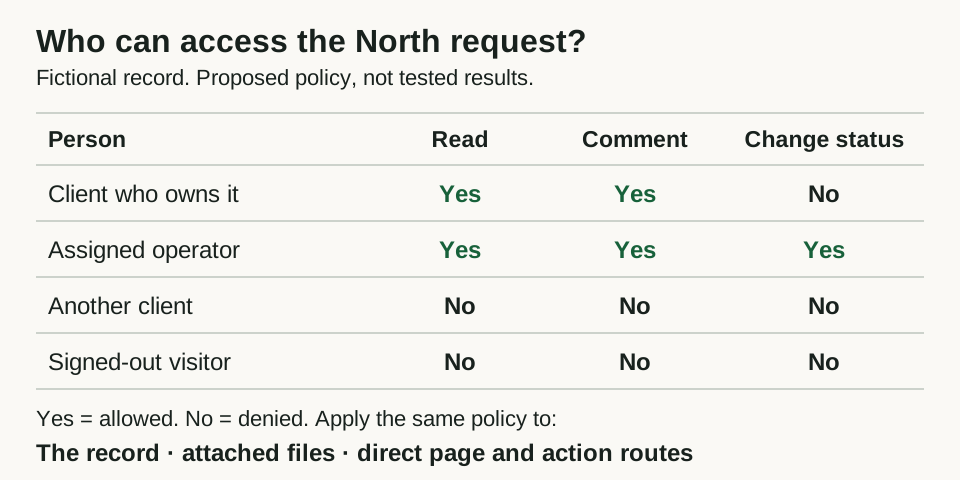
A fictional permission policy to turn into test cases. This diagram describes expected access, not observed results or a completed security review.
Open full-size imagePrepare a test you can repeat
Create Client A in North Workshop, Client B in South Studio and the assigned operator. Give the two requests distinct fictional titles, such as “North sample banner” and “South sample flyer.” Use harmless attachments with similarly distinct names.
Open the clients in separate browser profiles so their sessions do not replace each other. Two ordinary tabs in one profile usually share sign-in state. Keep a separate signed-out profile too. Record the app version or change under test, the date and each account's role; keep passwords and session tokens out of the worksheet.
While signed in as the permitted person, copy each sample record's detail link and attachment link. These known links let you test the boundary without searching for anyone else's records. Do not enumerate real customer identifiers or test unrelated apps.
Check the list and the direct route
Client B should not find North's request in a list, search result, recent-items panel or notification. Then paste North's known detail link into Client B's profile. A hidden dashboard card is insufficient if that direct link still opens the record.
Use this starting matrix. “Deny” means no private content is returned and no prohibited change happens; the precise error screen may differ by app.
| Person and action | Expected result |
|---|---|
| Client A opens North's request and attachment | Allow |
| Client B searches for North's sample title | No North result or private snippet |
| Client B opens North's direct request link | Deny |
| Client B opens North's attachment link | Deny |
| Client A adds a comment to North's request | Allow and persist |
| Client B tries to add a comment to North's request | Deny; no comment is created |
| Assigned operator changes North's status | Allow and persist |
| Same operator opens South's request | Deny |
| Client A attempts an operator-only status change | Deny; status stays unchanged |
| Signed-out visitor opens either private link | Deny or require sign-in before returning content |
| Client A loses North membership and reuses the old link | Deny on the next access request |
Repeat the client checks in the opposite direction: Client A must not access South's records. For each row, record what happened. If your app has no search, mark it “not applicable.” If you cannot exercise a protected action, mark it “not tested.” Neither label means passed.
Follow the file, export and update paths
A request page and its attachment can have different access rules. Test the file link itself in the wrong account and signed-out profile. If the app deliberately creates shareable links, specify who may create them, how long they last and whether revocation is supported. Do not describe such a file as private to members without checking that policy.
Repeat the same exercise for exports, previews and comments where those features exist. Check whether an export includes another workspace's rows or a preview reveals a private title. Limit the exercise to the features your pilot will use.
For changes, use a reversible sample action. Check the saved record afterward from the permitted account: an error message does not prove that nothing changed. If the interface hides the action, ask the builder to test the underlying server request against these same fixtures. Record that as outstanding until someone verifies it. Hiding a control is useful interface behavior, but permission must also be enforced where data is read or changed.
Test what happens when access changes
Remove Client A's membership through the authorized administration flow. Leave their existing session open and try the saved request and attachment links again. Test a fresh navigation and refresh, then sign out and back in. Repeat for an operator who is reassigned to another workspace.
A screen already loaded in a browser may retain old content. Note that separately from a new request returning private data. Revocation cannot retract a file someone already downloaded. Your policy should distinguish future access, content already displayed and previously downloaded copies.
If the expected revocation behavior is unclear, settle it before marking the row passed. “Eventually disappears” is not a usable acceptance criterion for a private client portal.
Turn a failure into a precise repair request
Keep the private pilot on hold if a denied path exposes a record or permits a change. Record the role, sample record, action, expected outcome and actual outcome. Redact secrets from screenshots and logs. Avoid putting private links or real client information in public issue trackers.
A useful repair request looks like this:
In our authorized test app, Client B can open Client A's sample
attachment through its saved link, although the request page denies access.
Expected: only current members of that attachment's workspace may read it.
Fix the file access boundary, then repeat both allowed and denied checks.
Confirm Client A still opens the file and Client B receives no file content.
Record the tested version and any untested paths. Use sample data only.
After the repair, rerun the failed row and its allowed counterpart. Then repeat the related record, file and membership-change checks. This catches a fix that blocks everyone or closes one route while leaving another open.
Use a template as a starting point
The public Quarry template illustrates projects grouped by phase. Its remix entry is a starting point for your own app, subject to sign-in, account access and credits. The public board does not demonstrate private client isolation; this exercise makes no claim that Quarry has passed it.
Add your completed matrix to the app brief and keep it with the launch checklist. Passing these checks provides evidence for the particular version, roles and paths tested. It does not cover every security risk or replace a broader review when the data and business requirements call for one.