

An equipment checkout plan should answer three questions separately: where is the item, is it ready to use, and has someone reserved it? A camera can be back on the shelf and still need an inspection. A reservation can exist before anyone takes possession. Keeping those facts separate makes the next handoff easier to explain.
Use the equipment checkout worksheet to map your own process. The six-item camera cupboard below is fictional. Its rules are a proposed workflow to implement and test, not a demonstrated Overskill inventory feature or a claim about a particular template.
A return still needs a check.
Fictional media-team cupboard · Proposed workflow
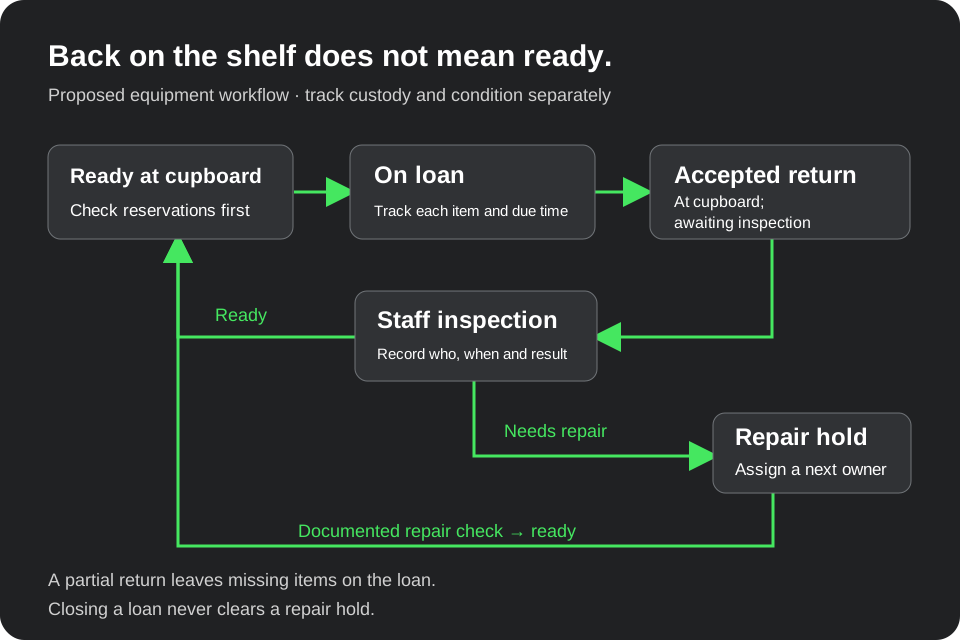
Original proposed workflow diagram. Reservations stay separate from custody; a returned item needs inspection before reuse. This is not a product screenshot.
Open full-size return workflowGive each physical item a stable ID
Start with individual items that can be borrowed, lost, returned or repaired separately. Two cameras with the same model name still need different IDs. Keep the ID when you rename an item or change its storage location.
Our example cupboard holds CAM-01 and CAM-02, a microphone MIC-01, a tripod TRI-01, a light LGT-01 and a cable CAB-01. All six begin at the cupboard and ready for use. A kit is a list of item IDs; it does not replace the individual records.
Scroll horizontally to compare all columns.
| Record | Minimum information | What it lets your team answer |
|---|---|---|
| Item | Stable ID, description, home location, condition | Which physical thing are we discussing, and can it be used? |
| Loan | Loan ID, borrower, checkout time, due time | Who accepted custody, and when should it return? |
| Loan item | Loan ID, item ID, accepted-return time | Which parts of a kit are still out? |
| Inspection | Item ID, checker, time, result, evidence note | Who decided the returned item was ready or needed repair? |
| Reservation | Reservation ID, item IDs, owner, start, end, status | Who has planned use, before a physical handoff occurs? |
Use a borrower account ID in the app and a readable name in the staff view. Store only the contact information the team needs. The sample worksheet contains no real borrowers or contact details.
Separate custody, condition and reservations
For this first version, custody is either at the cupboard or on loan. Condition is ready, awaiting inspection, or repair hold. A reservation has its own active or cancelled status and a time window.
An accepted return changes custody to the cupboard and condition to awaiting inspection. A staff check can then make the item ready or place it on repair hold. The borrower's “I returned it” message alone does not complete that handoff; a staff member must confirm the item they received.
“Available” should be the answer to a specific request. For immediate checkout in this example, the item must be at the cupboard, ready, and free of a conflicting active reservation. A due time passing does not return equipment automatically. Compare the requested checkout-to-return interval, including any chosen turnaround allowance, with reservation windows. Future availability also depends on that planned period and existing reservations; a screen showing an empty calendar cannot prove physical readiness.
Write a clear rule for touching reservation windows. This example treats an end time as the first instant outside the reservation: 14:00–17:00 does not overlap 17:00–18:00. That boundary rule does not guarantee a 17:00 physical handoff. Your team may need turnaround time for inspection; include it in your booking policy. Reject a reservation whose end is at or before its start; an empty or reversed window is an input error, not an available slot.
Work through a partial kit return
On October 10, 2026, this fictional team uses America/Chicago local time. The
worked timestamps include the UTC offset, -05:00, so the comparison is explicit.
Use an actual timezone and date in your own app; do not assume that offset applies
throughout the year.
At 08:15, Mira checks out CAM-01, MIC-01 and TRI-01 on loan L-01, due at 16:00. At 08:30, Jon reserves CAM-02 from 14:00 to 17:00 without taking it. At 13:30, Omar checks out LGT-01 on loan L-02, due at 16:30.
At 16:10, staff accept CAM-01 and MIC-01 back from Mira. TRI-01 is still out. Staff clear CAM-01 at 16:12. At 16:13, they find a loose connector on MIC-01 and place it on repair hold. Jon cancels his camera reservation at 16:15.
Here is the cupboard at 16:30:
Scroll horizontally to compare all columns.
| Item | Custody | Condition | Immediate checkout | Next action |
|---|---|---|---|---|
| CAM-01 | Cupboard | Ready | Yes | Keep its inspection record |
| CAM-02 | Cupboard | Ready | Yes | Cancelled reservation stays in history |
| MIC-01 | Cupboard | Repair hold | No | Assign and document the repair check |
| TRI-01 | Mira, L-01 | Ready when issued | No | Resolve the return, 30 minutes overdue |
| LGT-01 | Omar, L-02 | Ready when issued | No | Due now; confirm the physical return |
| CAB-01 | Cupboard | Ready | Yes | No open loan or reservation |
The counts reconcile: six items = four at the cupboard + two on loan. Of the four at the cupboard, three are ready and one is held for repair. Only three are eligible for immediate checkout under this example's rules.
The overdue comparison is strict: an open loan is overdue when the observation time is later than its due time. LGT-01 is due now at 16:30, not yet overdue; TRI-01 is 30 minutes overdue. Keep due-now and overdue labels separate, and show the observation time beside the list.
Close the return without hiding repair work
When staff accept TRI-01 at 16:35, all three items from L-01 have returned. The loan's custody work can close, while MIC-01 remains on repair hold and TRI-01 awaits inspection. Closing a loan must not mark every item in it ready.
For the same reason, returning two of three items must not close the whole loan. Record each accepted return on its own loan-item row. If someone clicks twice, the second submission should identify the existing return rather than adding a second item or clearing a newer loan.
A repair clearance needs an authorized checker, a timestamp and a useful evidence note. “Looks fine” is difficult to act on later. “Connector secured; test recording reviewed with headphones; no intermittent signal during the check” explains what was examined. This is sample documentation, not a repair certification or a substitute for the manufacturer's procedure.
Decide who can change each fact
Borrowers need a view of their own loans and a way to report a return or problem. Staff need to accept physical returns and complete inspections. A manager can correct a mistaken entry with a reason, keeping the original history visible.
Do not give a borrower a button that releases their own damaged item from repair hold. Hiding the button is only one part of the job: test the underlying request with the wrong account as well. Use the private-record access guide to prepare allowed and denied cases without using real personal information.
Make ownership explicit when work stalls. The overdue list needs someone to resolve the return; the repair list needs someone to inspect the item. A red badge by itself does not assign either task. Reminders, barcode scanning and messaging are additional connections to configure and verify if you choose to add them.
Turn the worksheet into a testable app brief
Start from Overskill's internal-tools page with one cupboard, individual items and two staff roles. Adapt this brief:
Build an equipment checkout app for a small media team using six fictional items. Store item identity, custody and condition separately. Track each item on a loan so staff can accept a partial return. Accepted returns await inspection; closing a loan never clears repair holds. Keep reservations separate from possession. Borrowers can see their own loans and report a problem; staff accept returns and document inspections. Show due-now and overdue items at an explicit observation time. Start without barcode, payment or message connections. Include sample records and checks for duplicate returns, conflicting checkouts and unauthorized repair clearance.
Use the app brief guide to add your own rules and definition of done. Before real use, repeat the example with two browser sessions: try to check out the same item twice, return only part of a kit, reload both views and attempt a repair clearance from the borrower account. Record the actual result. The worksheet defines the behavior you want; the built app still has to demonstrate it.