

A service estimate should show how the inputs become a total and where that answer stops being useful. Write the formula, minimum charge and review conditions before adding a polished result screen.
This guide specifies a calculator for fictional office cleaning. It includes worked totals and unsuitable inputs, plus an editable formula and test worksheet. The worksheet is a planning resource; this page does not provide a live calculator or create a saved quote.
Make the minimum charge visible.
Clear Desk · Fictional cleaning estimate
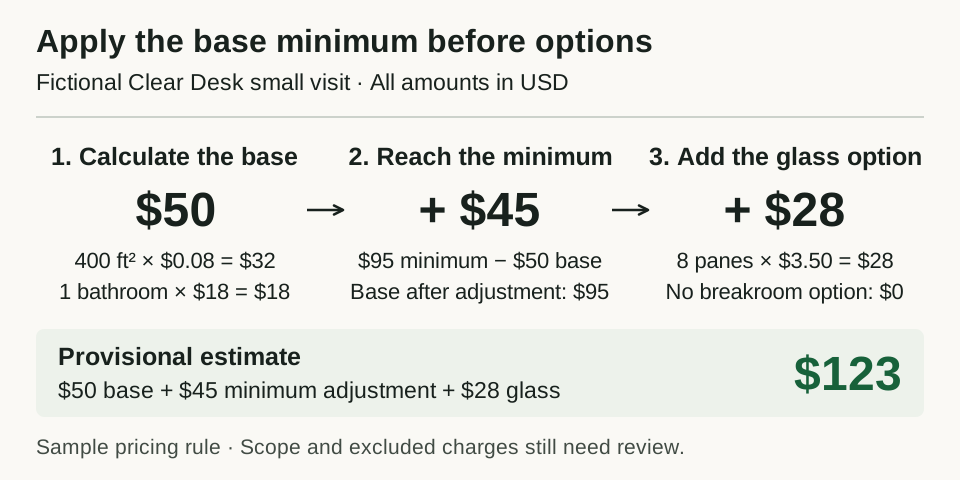
The smaller visit from the worksheet. The minimum applies to the base visit before options; these invented amounts demonstrate the ordering.
Open full-size estimate diagramDefine one job the estimate covers
The fictional Clear Desk service wants a provisional estimate for one routine office-cleaning visit. The customer supplies the floor area, bathroom count, interior glass-pane count and whether a breakroom deep clean is requested. The business supplies the rates and minimum visit charge.
All amounts below are invented US-dollar inputs for demonstrating arithmetic. They are not market rates, price recommendations, earned revenue or a claim about cleaning productivity. Replace them with your own reviewed rates before using the method for a business.
The sample excludes travel, parking, tax, exterior glass, specialist work and conditions needing an inspection. It does not produce an invoice, reserve a visit or establish the amount a customer must pay. The next step is to confirm the scope and applicable charges with the service provider.
Separate customer inputs from the rate sheet
| Customer input | Unit and accepted range |
|---|---|
| Floor area included in this visit | Whole square feet, 1–5,000 |
| Bathrooms included | Whole count, 0–12 |
| Interior glass panes | Whole count, 0–30 |
| Breakroom deep clean | Explicit Yes or No |
| Specialist work or uncertain scope | Explicit Yes or No; Yes requires human review |
These ranges define the sample calculator's supported cases, not what every cleaning service should accept. An area of 5,001 square feet needs review instead of extrapolation. A blank bathroom field is missing information; it must not silently become zero. Zero panes is a valid deliberate choice.
The business's separate sample rate sheet is:
| Rate setting | Fictional value |
|---|---|
| Floor-area rate per square foot | $0.08 |
| Bathroom rate per bathroom | $18.00 |
| Minimum charge for the base visit | $95.00 |
| Interior glass rate per pane | $3.50 |
| Breakroom deep-clean option | $25.00 |
Store the currency and rate-sheet version with the assumptions. For this exercise the version is sample-2026-10-09, and every setting is a nonnegative dollar amount with at most two decimal places. The reference calculation accepts settings up to $10,000.00 each as a technical input limit. A missing setting is a setup error. A zero rate is accepted only as an explicit setting and remains visible in the itemization; it must not result from an empty field.
State exactly where the minimum applies
The sample minimum covers the floor-area and bathroom portion. Glass and the breakroom option are added afterward. That ordering is part of the policy.
Area line = square feet × area rate
Bathroom line = bathroom count × bathroom rate
Base subtotal = area line + bathroom line
Minimum adjustment = max(0, minimum visit charge − base subtotal)
Glass line = pane count × glass rate
Breakroom line = option price if selected, otherwise 0

Provisional estimate = base subtotal + minimum adjustment
                       + glass line + breakroom line
Use integer cents for this specification. Each rate has at most two decimal places and each quantity is a whole number, so every line is already an exact number of cents. No percentage discount, tax calculation or intermediate rounding is part of this version. A rate such as $0.085 needs a different precision and rounding policy; reject it rather than quietly rounding it.
Reproduce the ordinary visit
Enter 900 square feet, two bathrooms, eight panes, Yes to the breakroom option and No to specialist work. The result is:
Scroll horizontally to compare all columns.
| Line | Calculation | Amount |
|---|---|---|
| Floor area | 900 × $0.08 | $72.00 |
| Bathrooms | 2 × $18.00 | $36.00 |
| Base subtotal | $72.00 + $36.00 | $108.00 |
| Minimum adjustment | max($0.00, $95.00 − $108.00) | $0.00 |
| Interior glass | 8 × $3.50 | $28.00 |
| Breakroom option | Selected | $25.00 |
| Provisional estimate | $108.00 + $0.00 + $28.00 + $25.00 | $161.00 |
Show the entered quantities and rate version beside this answer. Keep the excluded charges and the need to confirm scope visible near the total. A customer should be able to correct a quantity and see which line changed.
Check the minimum with a smaller visit
Now enter 400 square feet and one bathroom, with no panes or breakroom option. The base subtotal is $32.00 + $18.00 = $50.00. The minimum adjustment is $45.00, producing a $95.00 provisional estimate.
Add eight panes while keeping everything else unchanged. The glass line becomes $28.00, and the new total is $123.00: the $95.00 minimum base visit plus $28.00 in glass work.
Applying the minimum after all options would produce $95.00 for those same inputs: max($95.00, $50.00 + $28.00). That is a different pricing rule. The worksheet makes the chosen order visible so a builder cannot substitute it accidentally.
Refuse an unsuitable estimate clearly
Use three distinct outcomes:
Scroll horizontally to compare all columns.
| Outcome | When to use it | What the reader sees |
|---|---|---|
| Needs correction | Missing, negative, fractional or incorrectly typed quantities; missing choices; invalid rate settings | The fields that need correction; no total |
| Needs review | Otherwise valid quantities exceed the sample limits, or specialist/uncertain scope is Yes | The reason for review and a request to confirm scope; no total |
| Provisional estimate | All required inputs are valid and within the supported scope | Itemized amount, input assumptions, rate version, exclusions and next step |
Validate field shape first, then review conditions, then calculate. Do not display a partial total when one field still has an error. Clear an earlier result as soon as an edit makes the inputs invalid or needs review, so a stale $161.00 cannot look like the answer to a different job.
At the upper accepted quantities—5,000 square feet, twelve bathrooms and thirty panes, with the breakroom option—the expected amount is $400.00 + $216.00 + $105.00 + $25.00 = $746.00. That is a boundary test of this fictional model, not an offer to perform that job.
The worksheet includes a compact answer set for the usual case, the minimum, selected options, zero quantities, missing inputs and cases that need review. Keep invalid inputs visible for correction instead of replacing them with invented defaults.
Turn the specification into a build request
The lead-magnet guide covers choosing a useful customer question and deciding whether contact capture belongs in the experience. This exercise contributes the exact estimate rules and test cases. It does not measure lead generation or require a contact form.
Build a provisional service-estimate calculator from my completed worksheet.
Keep the business rate sheet separate from the customer inputs.
Label quantities, currency, rate version and excluded charges.

Apply the base minimum before glass and breakroom options. Use exact cents.
Show each calculation line. Validate every required input before calculating.
For invalid inputs or cases needing review, show reasons and no numeric total.
Clear any earlier result when its inputs no longer pass validation.

Compare the worksheet's ordinary, minimum, option and boundary examples.
Use fictional data. Do not save customer details, send quotes, take payments
or imply a booking. Report tests and remaining setup separately.
Add the specification to your app brief, and review current plans and credits before building. In the app, test every worksheet case, keyboard and phone use, and the change from a valid result to an invalid input. If you later add saved quotes or downloads, verify their actual contents and behavior separately. The launch checklist covers the wider release checks.