


A useful lead magnet helps someone make a decision before it asks them to become a lead. Choose one question your customer already has, collect only the inputs needed to answer it, and give them a result they can understand and challenge.
A calculator, assessment or planning tool can do that well. The value comes from the decision it supports. Use the editable app brief to define the question, calculation and next step before adding contact forms or follow-up messages.
Let someone inspect the answer.
Scenario Lab · Public demo with fictional planning data
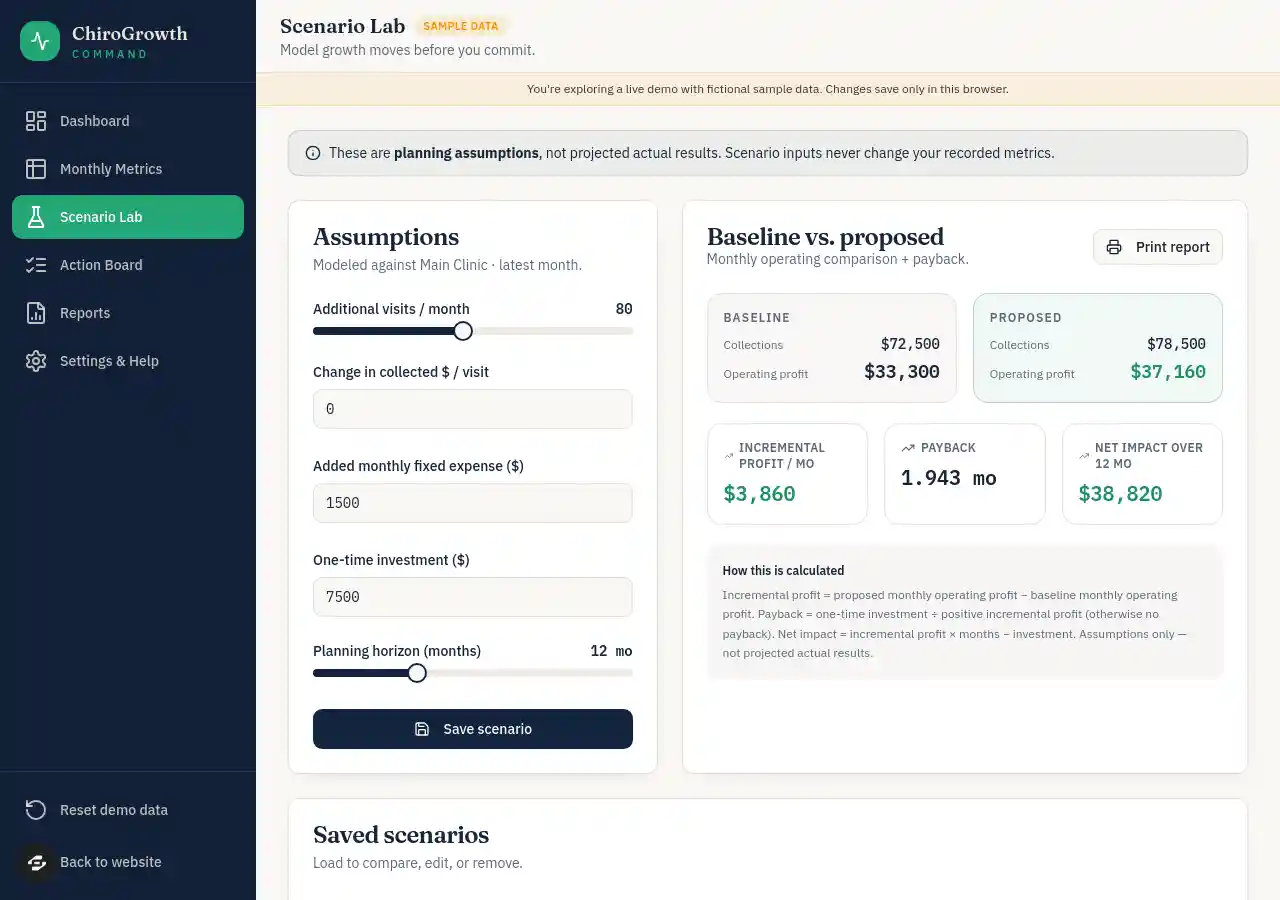
An actual public Scenario Lab capture from September 9, 2026. Fictional planning values let the reader inspect the relationship between assumptions and results.
Open full-size screenshotStart with the customer's question
“Download our business guide” asks someone to invest attention without knowing what they will get. “Would this additional monthly cost make sense at our expected volume?” gives a planning tool a specific job.
Write the question in words your customer would use. Then describe the smallest useful answer. A service owner might need a break-even estimate. A consultant might help someone compare two ways of delivering a workshop. A project planner might turn a list of requirements into a preparation checklist.
Choose a question you can explain accurately. A polished score with no understandable method gives the reader little reason to trust it. If an input is uncertain, show how changing it affects the answer.
Make the result worth inspecting
The public ChiroGrowth Scenario Lab provides a worked example using fictional practice-business data. Its sample baseline has $72,500 in monthly collections and $39,200 in expenses, leaving $33,300 in modeled operating profit.
One scenario adds 80 monthly visits. It keeps collections at $75 per visit, variable cost at $8 per visit and the price change at $0. With $1,500 in extra monthly fixed costs, the calculation is:
80 × ($75 − $8) − $1,500 = $3,860 monthly improvement
$33,300 + $3,860 = $37,160 proposed monthly profit
Now change only the added monthly fixed cost to $10,000:
80 × ($75 − $8) − $10,000 = −$4,640 monthly change
$33,300 − $4,640 = $28,660 proposed monthly profit
The proposed business still has positive modeled profit. The plan is worse than its baseline by $4,640 a month. That is the decision the tool makes visible. Calling the whole business unprofitable would misread the result.
September 8, 2026 preview checks recorded the positive scenario and the negative change after increasing the added cost. The September 9 public capture shows the starting assumptions and output. These are fictional calculations, not a clinic's earned profit or a recorded improvement in lead generation. The MCP case study explains the checks and their limits.
Let an unfavorable answer be useful
A planning app earns its place by helping the reader understand a tradeoff, including one that makes an offer less attractive. Keep the other inputs fixed while changing a single assumption. Show the original and proposed result together, with units beside every field.
For the sample above, the extra visits contribute $5,360 before the additional fixed cost. That makes $5,360 the break-even added monthly cost for those particular assumptions. Above it, the proposed change reduces monthly profit; below it, it improves the model. It is not a claim that those visits will happen.
A helpful next step might be “Check whether the additional volume is realistic” or “Compare a lower-cost version.” It does not need to be “Buy now.” If the answer depends on missing information, help the reader find that information.
Choose the right kind of app
Scroll horizontally to compare all columns.
| Format | Useful when the reader needs to… | The answer must include… |
|---|---|---|
| Calculator | Understand a relationship between quantities | Inputs, units, formula, assumptions and an explainable result |
| Assessment | Identify which preparation steps apply | Clear criteria and a reason for each recommendation |
| Configurator | Compare a few practical options | What changes between options, what stays fixed and what is excluded |
| Checklist builder | Prepare for a specific task | An actionable list tied to the reader's answers |
For a worked assessment, try the transparent quiz matcher. Change a requirement to see why an option is eligible, excluded or tied before adapting its rule matrix.
For a date-planning example, work backward from an event date. Inspect counted and skipped days, then explain a missed starting date without promising capacity or delivery.
Choose the format that answers the question with the fewest unnecessary inputs. Explain the criteria behind an assessment; avoid scores that look authoritative without a method behind them.
Write the smallest complete brief
Here is a fictional workshop-planning example. The download contains the same brief plus fields for your own version.
Build a workshop contribution calculator using fictional sample data.
Help an organizer compare ticket income with event costs.

Inputs: expected paid attendees, ticket price, fixed event cost,
and variable cost per attendee. Label all money in one selected currency.
Sample: 20 attendees, $40 ticket, $300 fixed cost, $5 cost per attendee.
Calculate contribution = attendees × (ticket price − variable cost) − fixed cost.
Show $400 contribution for the sample, with the calculation visible.

Let the reader change one input and compare with the sample.
Reject negative amounts and fractional attendee counts with a clear message.
Label outputs as estimates based on entered assumptions, not promised income.
Keep results visible without requiring an email address.
Do not save personal data, connect payments or send messages in this version.
Explain whether inputs survive reload; do not imply they are saved if they are not.
Provide a short checklist of assumptions to verify before planning the event.
The sample calculation is 20 × ($40 − $5) − $300 = $400: contribution after the listed costs, not total business profit. Taxes, fees, refunds or staffing costs need their own inputs if relevant. This is a proposed app brief. Test that small calculation before adding accounts or proposals.
Check usefulness before adding a form
Ask someone in the intended audience to use a disposable version with sample information. Give them a task, then observe what they do. Do they understand the question? Can they explain the result? Do they know which assumption to check next? Record their actual feedback instead of describing the app as validated in advance.
Your acceptance checks should include:
- The sample inputs produce the expected result, and the calculation is visible.
- Changing one input changes the answer in the expected direction and amount.
- An unfavorable result stays readable and receives a useful explanation.
- Invalid or empty inputs produce clear messages rather than a misleading answer.
- Labels, controls and results work on a phone and with a keyboard.
- Reload behavior matches the saving promise, and private information is not requested unnecessarily.
The brief download gives you Expected, Observed and Status fields. Leave unperformed checks Not tested.
Connect the next step to the answer
Once the tool is useful, decide whether a next step belongs there. A reader might want to revise assumptions, download a checklist, discuss implementation or continue into a larger workflow. Explain what that step provides before asking for contact details.
If you add email capture, tell the person what will be sent and how their information will be used. Test the connection, consent choice and failure message before relying on it. Measure completed requests separately from successful delivery and subsequent conversations; displaying a form proves none of those outcomes.
Inspect the Growth public remix page for a real starting point; creating a copy continues through sign-in and account access checks. Check current pricing, use the MCP walkthrough for construction and inspection, and apply the launch checklist to your own app. Build around a useful answer that stands on its own, then give the reader a relevant way to continue.