


An app needs to handle the moment someone leaves. Test a useful task through sign-in, a reload, a second click and a return visit. The person should know what was saved, which account owns it and whether the action actually happened.
Start with one journey and a clear expected result. A booking request, client upload or app-building brief will expose more useful questions than clicking every menu. Use the editable interruption worksheet to record what happens; its results begin Not tested.
Give the person a way back.
A request, its owner and one clear next step
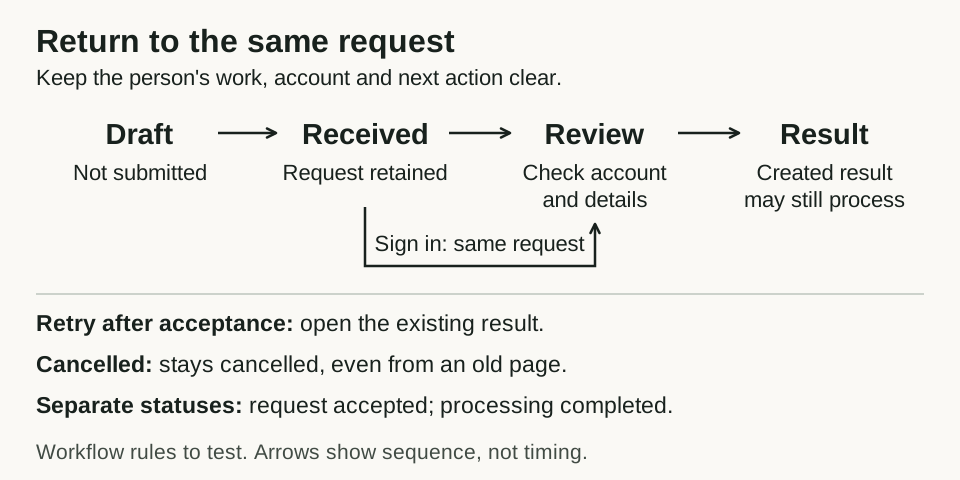
A map for designing and testing a return journey. Each stage needs its own clear status; this diagram is not a record of completed tests.
Open full-size workflow mapChoose the moment that matters
Imagine a customer writing a request for a consultation. They choose a service, explain what they need, then discover they must sign in. After signing in, they should recognize their request and understand the next step. They should not need to reconstruct it from memory.
Write down the important details before testing: service, message, requested date and account. Then interrupt the journey deliberately. Leave the page, return, change accounts or press Submit again after an unclear response. Each interruption asks a different question.
For an appointment app, the Bookslot example is a place to inspect the public booking screens. Its remix page continues through sign-in and access checks. The tests below are proposed requirements for your own app, not claims that this template already passes them. The booking guide covers availability and conflicting appointments separately.
A worked example from Overskill's builder
Overskill has an interruption of its own: someone submits an app request before signing in. The recovery flow keeps the submitted request for an explicit review instead of treating a successful sign-in as permission to start building.
In the September 9, 2026 local browser checks, a submitted brief survived the signup detour and email-code sign-in. The request became associated with the signed-in owner, while no result app existed yet. A notice led to a review showing the brief, workspace and relevant access requirements. That request was later discarded and stayed cancelled.
A separate brief, submitted while signed in, created an app record only after an explicit start from review. A remix request survived its own signup detour and email-code sign-in, then created a result after review. Repeating each accepted submission returned its existing result instead of creating another app.
Those were real forms and account checks in an isolated test environment. Automatic generation was disabled, and the queued remix job was not performed. The evidence concerns preserving a request, reviewing it and avoiding duplicate app creation. It does not establish that a generated app finished building or that an external service completed its work.
That distinction is useful in any app. A customer needs an answer to both “Did you receive my request?” and “Has the work finished?” One success message cannot safely mean both.
Give each stage an honest name
| Stage | What the person should understand |
|---|---|
| Draft | Text is being prepared. Explain whether it is saved and where it can be recovered. |
| Submitted request | The app received an instruction, but another step may still be required. |
| Ready for review | The person can inspect the details, account and consequences before continuing. |
| Result created | There is a specific result to open. Any processing or external work has its own status. |
Overskill's unsent local drafts and submitted builder requests are separate features. A useful app should make that difference understandable too. “Saved” should describe something the person can actually retrieve; “Complete” should describe the intended outcome.
Run eight interruption checks
Use fictional records and two accounts you control. Start a fresh sample request for each check that accepts, cancels or expires one; record which request you used. Try the journey on a phone too. Keep payments and messages to real people out of the first pass.
Leave before submitting. Enter a distinctive message, then reload or navigate away. Record whether it returns. If the app does not save drafts, the interface should explain that before someone loses meaningful work. A draft from another account must not appear.
Sign in halfway through. Begin signed out, submit the request and follow the real sign-in path. Check every important field afterward. Reaching the account home page is not enough; the person needs a clear route back to the task.
Review before continuing. Verify the account, destination and original details. If continuing can create a booking, spend credits or start other work, the control should say what it does. Sign-in alone should not silently authorize an action your design requires the person to review.
Change accounts. Leave the review open, sign out and use your second test account. Revisit the old page. The second person must not see private details or continue the first person's request. If your app uses workspaces, also check a workspace switch.
Retry an unclear submission. In a disposable environment, repeat the same request after an interrupted response or a second click. Check the actual records, not just the button animation. If the first attempt succeeded, the retry should identify its result instead of duplicating the work. Ask for technical help to exercise the interrupted-response case safely.
Cancel, then return. Discard a pending request and revisit its old page using Back or a saved link. It should remain cancelled. A stale screen must not quietly make the cancelled action available again.
Let the request expire. Use the app's documented expiry or a controlled test setup. The old request should explain that it is unavailable and offer a deliberate new start. Returning to the page must not secretly extend its life or recreate it.
Follow a failed result. Separate a request being accepted from its later processing. If processing fails, the person should see the existing result and a clear recovery option. Check what a retry will repeat before using it for a payment, notification or another external action.
Ask for the behavior before the repair
When two people edit the same record, try the separate shared-edit rehearsal. Compare each person's original and proposed values with the current record, then test stale saves and permission changes in two authorized sessions.
Give your builder one observed failure with the expected result. This is more useful than asking it to “fix login” or “make saving reliable.”
In this test app, a customer starts a consultation request while signed out.
Preserve the service, requested date and message through sign-in.
Show the signed-in account and request details before final confirmation.
Check the current account's permission when it confirms.

If the same submitted request is retried after success, open its existing result.
Keep cancelled or expired requests unavailable from old pages.
Distinguish request received, result created and later processing completed.
Explain draft storage, expiry and recovery limits to the customer.
Use fictional test accounts. Do not connect payments or send notifications yet.
Report the checks performed and anything still Not tested.
After a repair, repeat the original successful journey as well as the interruption. A fix that preserves a draft but sends it to the wrong account has not finished the job.
Define what a good return looks like
When a later notification is part of the journey, use the email evidence replay to distinguish an accepted request, duplicate provider events and an outcome that is still unknown.
The person should recognize their work, understand its status and have one sensible next action. Record the account, request or result reference, expected behavior and observed behavior in the worksheet. Keep failure details free of real customer data.
Overskill's recovery keeps existing access checks and bounded request retention; it is not an indefinite archive or a guarantee that every external action happens exactly once. Your app needs its own policy and checks. Use the two-client comparison exercise for access and recovery, and the launch checklist before inviting customers.