

Before turning a spreadsheet into an app, decide what one row represents and which values identify the same thing. A client name, a work request and the services on that request need different rules. Writing those rules first gives you a way to check the resulting records.
Work through this small example: Harbor Light Services keeps maintenance requests in a sheet. The fictional export contains 12 rows. After review, it becomes five clients, seven requests and eleven request-to-service links. Four rows remain unresolved, and one is an identical duplicate. Every source row stays accounted for.
Use the source CSV, column map and blank mapping worksheet to follow the exercise. All names, addresses and work requests are invented. This is a data-planning example; no file in this package has been imported into an Overskill app.
Keep each record connected.
Harbor Light Services · Fictional data model
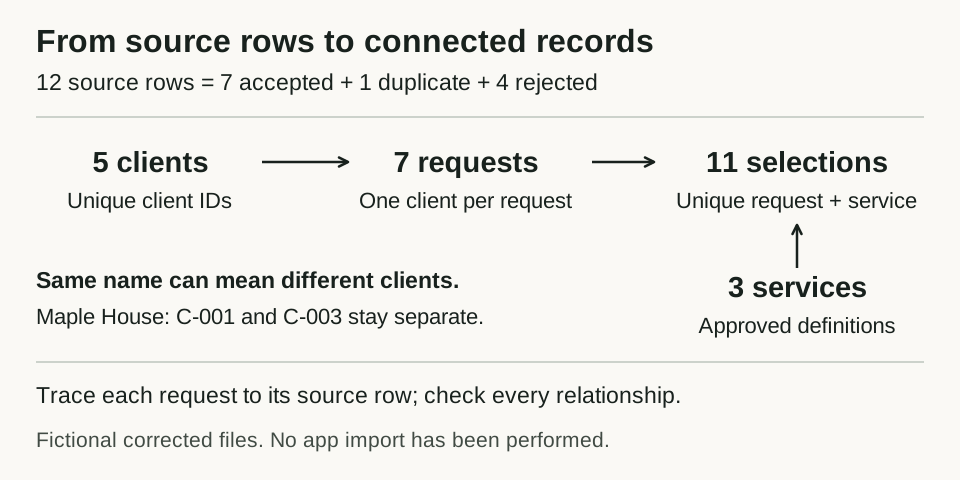
A map of the supplied fictional CSVs. The counts describe the corrected files, not an executed import or an app's saved records.
Open full-size record mapGive each kind of record a clear job
In the source sheet, one row is intended to describe one work request. The client details repeat whenever a client requests more work. A cell can also contain several services, such as Gutter cleaning;Window washing.
Separate the information into four tables:
Scroll horizontally to compare all columns.
| Table | One row represents | Identifier or relationship | Result in this example |
|---|---|---|---|
| Clients | One client account |
client_id identifies the client |
5 clients |
| Requests | One work request |
request_id identifies it; client_id names its client |
7 requests |
| Services | One approved service |
service_id identifies the service |
3 service definitions |
| Request services | One service selected for one request | The pair request_id + service_id must be unique |
11 selections |
These tables let a client have several requests and a request have several services. Client details have one home, so changing a contact address does not require editing every request row.
Download the expected clients, requests, services and request services. The services file is a small dictionary chosen for this exercise. It is not a list of Overskill features.
Keep IDs separate from names
Two accounts in the example are both called Maple House. C-001 uses [email protected]; C-003 uses [email protected]. Their distinct client IDs keep them separate.
The repeated name is not a reason to merge them. Email is a contact field in this example, not an identity key. Even if two accounts later shared an email address, that alone would not make them the same client.
Preserve the original export and assign each source row a stable reference for the review. Here, S001 through S012 are already present. If your sheet lacks those references, create them once in a saved snapshot before sorting. Keep the relationship between the snapshot and its row references; a changing spreadsheet row number cannot serve that purpose.
Each accepted request also retains source_row_id, which leads back to the original row. A source-row reference records where the data came from. It does not replace the request's business ID.
Write the cleanup rules before applying them
The sample's column map defines the destination, required fields and failure action for every source column. Four rules do most of the work here:
- Trim outside whitespace from names and identifiers. Preserve the actual ID text.
- Store dates as
YYYY-MM-DD. This fixture explicitly uses month/day/year for dates such as10/02/2026, so that value means October 2. Confirm the source's convention before interpreting a real slash-separated date. - Map the declared status labels to
new,scheduled,in_progressandcompleted. For example,Donebecomescompleted; an unknown status needs review. - Split services at semicolons, trim each label and match it to the approved service dictionary. A repeated service within one request becomes one selection. An unknown service holds the whole request for review.
The fixture also treats contact-email capitalization as irrelevant, allowing [email protected] to match [email protected]. That is a declared rule for these invented records. Confirm your own contact-data policy before applying the same transformation elsewhere.
The normalization log records every changed source value used for accepted requests or the duplicate comparison. It lets a reviewer see what changed without guessing from the final files.
Handle duplicates and unresolved rows explicitly
Rows S002 and S005 carry the same request ID, R-1002. Once the declared date, spacing and status rules are applied, their complete request details agree. The example retains S002 and logs S005 as its duplicate.
If the date, client, services or status differed, the shared ID would be a conflict to resolve. Keeping whichever row happens to appear last could discard a real change. Decide how to handle that conflict before an import or update.
Four source rows stay out of the corrected tables:
Scroll horizontally to compare all columns.
| Source row | Problem | Required decision |
|---|---|---|
| S006 | Missing request ID | Find or assign the authoritative ID, then review the row again |
| S007 | Missing client ID | Confirm the client that owns the request |
| S008 |
2026-02-30 is not a calendar date |
Check the original request for its actual date |
| S012 |
Roof repair is outside this example's service dictionary |
Confirm a mapping or approve an additional service |
The rejected-row log keeps the original value, reason, responsible role and next action. Rejection here means excluded from this corrected batch while the issue is open. The source remains intact. C-004 is mentioned only on rejected rows, so it is not created in the expected clients table.
For S010, the source lists Window washing twice and Gutter cleaning once. The corrected request has two service selections. That rule would be wrong if repetition meant quantity. This fixture treats selections as unique choices; a quantity-based workflow needs a separate quantity field.
Reconcile the results before testing an import
Start with the source rows, then check the relationships. Counting every output row together would mix clients, requests, definitions and selections.
| Check | Expected result |
|---|---|
| Source-row accounting | 12 source rows = 7 accepted + 1 duplicate + 4 rejected |
| Client IDs used by accepted requests | 5 distinct IDs, all present once in Clients |
| Accepted request IDs | 7 distinct IDs, each linked to its accepted source row |
| Request-service pairs | 11 unique pairs, each pointing to an existing request and service |
| Service entries in the source cells | 17 entries = 11 retained selections + 1 repeated selection + 1 entry on the duplicate row + 4 entries on rejected rows |
Use the complete row disposition to locate every source row and the reconciliation note for per-client and per-service counts. A total can match while a relationship is wrong. Open R-1004 and check that it belongs to C-003, not the other Maple House account, and has both Pressure washing and Gutter cleaning.
Give the builder the map and the passing result
Add the decisions to your app brief. Here is a starting request for an app built from this example:
Plan a maintenance-request app using these fictional sample files.
Keep Clients, Requests, Services and Request services separate.
Use client_id and request_id as the supplied business identifiers.
Keep source_row_id on each accepted request for traceability.

Before loading anything, show the field mapping and any unsupported steps.
Use the declared date, status, contact and service rules in the worksheet.
Do not guess missing IDs or dates. Keep unresolved rows in a review log.
Flag conflicting records with the same ID; do not overwrite them silently.

The expected first batch has 5 clients, 7 requests and 11 service links.
Use the 3 supplied service definitions. S005 is a duplicate of S002.
S006, S007, S008 and S012 remain excluded pending review.
Loading the same batch again must not create extra records or links.

Start with staff-only access and sample data. Do not send messages.
Explain the supported loading method, then propose a small reversible test
and its reconciliation checks before changing any app data.
Overskill's import help is the separate place to check the current loading procedure. Read the spreadsheet connection guidance if you need updates after the first load. This example does not verify an importer, automatic synchronization or repeat-load behavior.
In an authorized test copy, compare the saved records with the expected files, return to them after a reload, and test the repeated batch. Add a conflicting record and check that the conflict remains visible. Record actual outcomes beside the expectations. Before introducing client accounts, use the private-record access guide to test who can read and change the resulting records.
Fill in the mapping worksheet for a small sample of your own data, resolve its unknowns, and use the brief builder to define the first workflow those records must support.