

“Active member” is too vague when a course starts on one date, pauses for a few days and closes on another. Specify which resource a person may open at the exact time they request it.
This fictional cohort exercise defines those decisions, including cancellation, rejoining and a transfer to a later cohort. Use the membership-window worksheet to record your own policy and expected boundary results. The answers are policy examples, not evidence that a template enforces them.
Name the instant access changes.
Field Notes · Fictional cohort policy in UTC
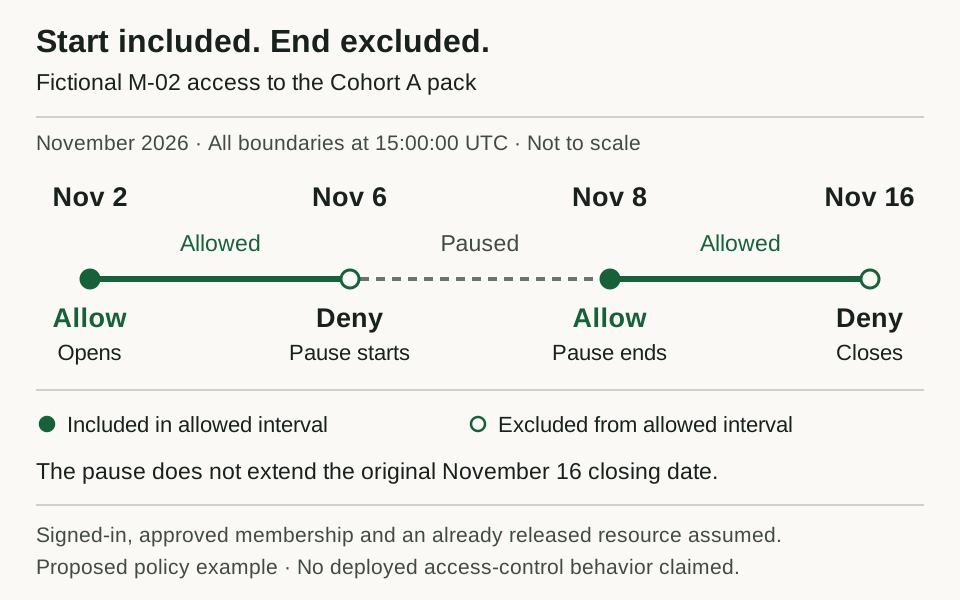
M-02’s sample policy in UTC. The pause changes access within the original window; these are expected decisions to test in an app.
Open full-size access timelinePut the time rule beside the offer
The fictional Field Notes course has two cohorts. Every time in this exercise is UTC, including displayed examples. The opening instant is included; the closing instant is excluded.
Scroll horizontally to compare all columns.
| Cohort | Access opens, included | Access closes, excluded | Second lesson releases |
|---|---|---|---|
| A | Nov 2, 2026 at 15:00 UTC | Nov 16, 2026 at 15:00 UTC | Nov 9, 2026 at 15:00 UTC |
| B | Nov 16, 2026 at 15:00 UTC | Nov 30, 2026 at 15:00 UTC | Nov 23, 2026 at 15:00 UTC |
An ordinary A member may open its released resources at 14:59:59 UTC on November 16. At 15:00:00 UTC, that access has ended. Write both instants in the test plan; “through November 16” would leave the boundary unclear.
Choose the timezone your own offer needs before converting dates into saved instants. The UTC choice here is explicit so the example does not depend on a reader's device timezone. It is not a recommendation that every course display UTC.
Give each access record a scope
An access record names the member, cohort, start and end. A resource also names its cohort and release time. A new cohort requires a new access record; changing a profile badge must not quietly reopen old material.
| Resource | Sample visibility policy |
|---|---|
| Public course overview | Everyone, including signed-out visitors |
| Member's own account page | That signed-in member, including before or after course access |
| Cohort pack and discussion | Signed-in members during an approved access window for that cohort, unless paused or revoked |
| Second lesson | Same conditions, plus its release time must have arrived |
| Another cohort's resources | No access without a valid access record for that cohort |
The discussion follows the same window for reading and posting. This sample provides no alumni archive, lifetime download entitlement or administrator exception. Add any such exception explicitly to your own policy and test it separately.
An invitation alone grants no course access. It lets the person follow your joining process; approval must create the access record. A screenshot saying “member” does not establish which records or files the person can open.
Apply one decision rule
For a protected cohort resource, the example allows access only when all of these conditions hold:
The person is signed in.
An approved access record belongs to this person and this resource's cohort.
Access start <= current time < access end.
No pause contains the current time.
No revocation has taken effect for that access record.
Resource release time <= current time.
Pause windows use the same included-start, excluded-end rule. A pause does not move the course closing time in this example. Revocation ends the named access record from its effective instant. A future, separately approved rejoin can create a new record; it cannot erase the earlier revocation history.
Retain the reason and effective time of changes. The actual app must enforce the decision when returning a protected page, file or data, and when accepting a post. The private-record access guide owns those implementation checks; this exercise supplies expected answers to test against.
Work through the member changes
All member IDs and events below are fictional. No payment is collected, cancelled or refunded in this exercise.
Scroll horizontally to compare all columns.
| Member | Approved records and events | Consequence under this sample policy |
|---|---|---|
| M-00 | Invited; no approved access record | Own account only after sign-in; no course resources |
| M-01 | A for its full window; rejoins B from Nov 20 at 15:00 until B closes | A ends Nov 16. No course access in the gap. B opens for this member Nov 20; A stays closed |
| M-02 | A for its full window; pause Nov 6 at 15:00 until Nov 8 at 15:00 | A is unavailable during the pause; resumes at its end; still closes Nov 16 |
| M-03 | A for its full window; cancellation request Nov 10 at 18:00 stops future renewal | Existing A access continues until its original end; no B record is created |
| M-04 | A for its full window; refund request Nov 11; separately approved revocation Nov 12 at 12:00 | The request alone changes no access. A ends at the explicit revocation instant |
| M-05 | Transfer effective Nov 9 at 15:00 closes A; approved B record starts Nov 16 at 15:00 | A stops at transfer. B remains closed until its own start; the seven-day gap is intentional |
Cancellation and refund handling here are proposed operating assumptions, not Overskill's creator-subscription rules, a tested payment integration or advice about refund obligations. The exercise deliberately separates a financial request from an access change. Your actual commercial policy and payment setup need to define which event authorizes a revocation and when it takes effect.
M-01's late rejoin ends with cohort B on November 30; it does not buy a new fourteen-day window in this sample. For M-05, moving to the later cohort does not provide early B access or preserve A access as a bridge. If you want either behavior, change the policy and expected answers before implementing it.
Check the exact boundaries
“Allow” and “Deny” below are expected results under the sample policy. They are not observed app results. Each member is signed in unless stated otherwise.
Scroll horizontally to compare all columns.
| Member and resource | Time in 2026, UTC | Expected |
|---|---|---|
| M-01, A pack | Nov 2 at 14:59:59 | Deny: window not open |
| M-01, A pack | Nov 2 at 15:00:00 | Allow |
| M-01, A second lesson | Nov 9 at 14:59:59 / 15:00:00 | Deny, then Allow |
| M-02, A pack | Nov 6 at 14:59:59 / 15:00:00 | Allow, then Deny as pause starts |
| M-02, A pack | Nov 8 at 14:59:59 / 15:00:00 | Deny, then Allow as pause ends |
| M-03, A pack | Nov 10 at 18:00:00 | Allow despite renewal cancellation |
| M-04, A pack | Nov 12 at 11:59:59 / 12:00:00 | Allow, then Deny as revocation takes effect |
| M-05, A second lesson | Nov 9 at 15:00:00 | Deny: transfer ended A even though the lesson just released |
| M-05, B pack | Nov 16 at 14:59:59 / 15:00:00 | Deny, then Allow |
| M-01, A pack | Nov 16 at 14:59:59 / 15:00:00 | Allow, then Deny |
| M-01, B pack | Nov 20 at 14:59:59 / 15:00:00 | Deny, then Allow on rejoin |
| M-01, A pack after rejoin | Nov 20 at 15:00:00 | Deny: B membership does not restore A |
| M-01, B second lesson | Nov 20 at 15:00:00 | Deny until Nov 23 at 15:00 |
| M-01, B pack | Nov 30 at 14:59:59 / 15:00:00 | Allow, then Deny |
An ending pause cannot extend an ending membership. If a pause ends at the same instant as the access window, the member remains denied because the access window is closed. Similarly, a lesson release cannot override a revocation or a cohort mismatch.
Keep changes understandable and repeatable
This sample allows one cohort at a time. Reject overlapping approved windows for different cohorts; pausing one does not permit a second cohort window. When a transfer is approved, record the old end and the new start together; show any gap before confirming the change. Preserve the earlier values and who authorized the transfer.
Keep the source event ID with each change so a retry can be recognized. A repeated cancellation or revocation must leave the same effective dates. Reprocessing an old event must not extend access or reopen a revoked record. A late event also needs an explicit effective time; its arrival time is not automatically the policy time.
Test the policy with an existing signed-in session and a fresh session, as well as direct lesson and attachment links. Content already displayed and files already downloaded need separate consideration; revoking future requests does not retract a person's existing copy. Keep those limits clear in your offer and test notes.
Hand the policy to the builder
The membership-site planning page covers the broader use case. Add this time policy to your app brief:
Build a cohort access test using my completed membership-window worksheet.
Use sample members, approved cohort records, release times, pauses and revocations.
Include the start instant and exclude the end instant. Display the timezone.

Keep invitation, renewal cancellation, financial requests and access changes distinct.
Do not extend the end for a pause or restore an old cohort when someone rejoins.
Preserve effective-time history and reject conflicting cohort windows.

Compare every boundary case in the worksheet. Test protected records, files and
posting from permitted, denied and signed-out sessions. Report actual evidence.
Do not connect payments, process refunds, send invitations or use real member data.
Review current plans and credits before building. Keep the worksheet's Observed column untested until the actual app produces evidence, then use the launch checklist for the remaining release work.