

A request queue needs to tell the team what happens next, who owns that step and why the request is in that position. Write the routing rules before asking an app to sort the work.
Use this twelve-request exercise to check those rules. Then download the editable triage worksheet and replace the sample with your team's categories and handoffs.
Account for every received request.
Northline Studio · Fictional routing exercise
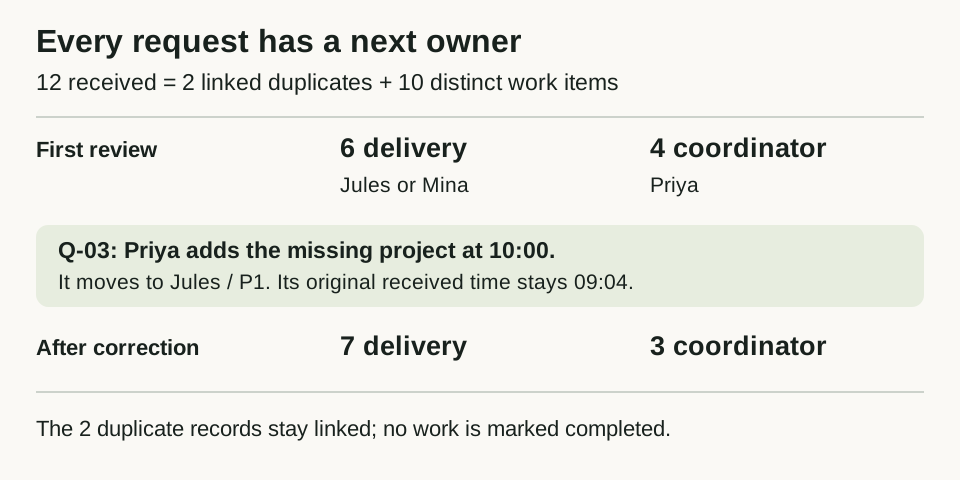
The fictional Northline Studio answer key. Routing changes the next worklist and owner; it does not delete source requests or establish completed service.
Open full-size routing mapDefine the small service team
Northline Studio is a fictional website and print team. Priya coordinates incoming requests, Jules owns Website work and Mina owns Print work. Copy is a supported service without an assigned owner yet. Every request and result below is fictional planning data. Times are October 8, 2026, America/Chicago.
The first review separates requests that a specialist can act on from requests that need the coordinator's attention. P1 means current work is verified as blocked; P2 means an ordinary change. These are this example's labels, not response-time promises or built-in Overskill priorities.
| Supported category | Delivery owner |
|---|---|
| Website | Jules |
| Mina | |
| Copy | Unassigned; Priya must arrange ownership |
Apply the first matching rule
Run the rules in order and stop at the first match. Record that rule number with the result so another person can explain the route.
Scroll horizontally to compare all columns.
| Order | First condition that matches | Route and owner |
|---|---|---|
| 1 | Coordinator confirmed this is the same request for the same project as an existing record | Link to the original; its owner handles the work |
| 2 | Project ID or usable request description is missing | Needs information → Priya |
| 3 | Category is not Website, Print or Copy | Needs classification → Priya |
| 4 | Category is supported but has no assigned owner | Assignment needed → Priya |
| 5 | Complete, assigned request has verified evidence that current work cannot proceed | Delivery, P1 → category owner |
| 6 | Complete, assigned request reaches this rule | Delivery, P2 → category owner |
Priya confirms duplicate links within the same project before rule 1 applies. Similar words in two clients' requests do not establish a duplicate. Retain the linked record and its source; it is excluded from the distinct-work count, not deleted or treated as completed service.
A “blocked” flag needs a short factual note about the work that cannot proceed. A requester's “urgent” label alone does not supply that evidence. Missing information, unknown categories and missing owners are handled before delivery priority.
Work through the twelve inputs
Records are shown by ID. Arrival time is a separate field; Q-04 and Q-10 arrived at the same recorded time.
Scroll horizontally to compare all columns.
| ID | Received | Category / project | Request facts |
|---|---|---|---|
| Q-01 | 09:00 | Website / WEB-1 | Replace header image |
| Q-02 | 09:02 | Print / PRINT-1 | Correct bleed specification; current export is blocked |
| Q-03 | 09:04 | Website / missing | Contact form fails; current work is blocked |
| Q-04 | 09:06 | Website / WEB-2 | Contact form rejects submissions; current work is blocked |
| Q-05 | 09:07 | Website / WEB-2 | Same form failure; confirmed duplicate of Q-04 |
| Q-06 | 09:08 | Translation / OTHER-1 | Translate welcome sheet |
| Q-07 | 09:10 | Print / PRINT-2 | Swap the brochure photo |
| Q-08 | 09:12 | Website / WEB-3 | Description missing |
| Q-09 | 09:14 | Website / WEB-1 | Change footer date; requester says urgent but no current work is blocked |
| Q-10 | 09:06 | Print / PRINT-3 | Fix rejected export; current work is blocked |
| Q-11 | 09:16 | Print / PRINT-2 | Same photo request; confirmed duplicate of Q-07 |
| Q-12 | 09:18 | Copy / COPY-1 | Revise the welcome paragraph |
For this exercise, the blocked-work notes on Q-02, Q-03, Q-04 and Q-10 are verified inputs. Q-03 still lacks a project ID. The two duplicate links are already confirmed by Priya. The exercise does not ask an app to infer either fact from the wording.
Compare your answer with the routing table
Scroll horizontally to compare all columns.
| ID | First matching rule | Result | Owner |
|---|---|---|---|
| Q-01 | 6 | Delivery · P2 | Jules |
| Q-02 | 5 | Delivery · P1 | Mina |
| Q-03 | 2 | Needs information | Priya |
| Q-04 | 5 | Delivery · P1 | Jules |
| Q-05 | 1 | Linked duplicate → Q-04 | Jules on original |
| Q-06 | 3 | Needs classification | Priya |
| Q-07 | 6 | Delivery · P2 | Mina |
| Q-08 | 2 | Needs information | Priya |
| Q-09 | 6 | Delivery · P2 | Jules |
| Q-10 | 5 | Delivery · P1 | Mina |
| Q-11 | 1 | Linked duplicate → Q-07 | Mina on original |
| Q-12 | 4 | Assignment needed | Priya |
Q-03 goes to Priya even though its note says work is blocked: rule 2 is reached first. Q-12 goes to Priya because Copy has no delivery owner. It must not become invisible in an unassigned bucket. Q-09 stays P2 because “urgent” is not verified blocked work.
The counts reconcile: twelve received records contain two linked duplicates and ten distinct work items. Six are ready for delivery, and four need coordinator action. Do not report twelve separate jobs or treat all ten as ready to start.
Make each worklist deterministic
For delivery work, sort P1 before P2, then by original received time, then by stable request ID. IDs in this example are fixed-width, so Q-04 precedes Q-10 when their time and priority tie.
The combined delivery order is Q-02, Q-04, Q-10, Q-01, Q-07, Q-09. Jules' list is Q-04, Q-01, Q-09. Mina's is Q-02, Q-10, Q-07.
Keep a separate coordinator list, ordered by received time and then ID:
Scroll horizontally to compare all columns.
| Order | Request | Priya's next action |
|---|---|---|
| 1 | Q-03 | Obtain the project ID |
| 2 | Q-06 | Classify the translation request or explain that it needs a different service |
| 3 | Q-08 | Obtain a usable request description |
| 4 | Q-12 | Arrange and record a delivery owner for Copy |
These lists describe the next review order. They do not estimate completion dates. If your team needs different response targets, agree them separately and show their basis rather than inventing deadlines from a priority label.
Change one input and rerun the rules
At 10:00, Priya adds project WEB-4 to Q-03. Its original received time remains 09:04, and every other input is unchanged. It now reaches rule 5: Website, Jules, P1.
The new delivery order is Q-02, Q-03, Q-04, Q-10, Q-01, Q-07, Q-09. The coordinator list becomes Q-06, Q-08, Q-12. There are still ten distinct work items: seven in delivery and three with Priya, plus the two linked duplicates outside those lists.
Save who changed the project ID and when. If a person overrides a route, retain the calculated result, the override, its reason and the new owner. A manual reassignment must not erase why the original rule matched.
Bring the rule sheet into a build request
The client-portal guide covers the broader request records and client access model. This exercise adds a specific routing policy to implement and test. It does not establish that a template already applies these rules.
Build an internal request-triage view from my completed worksheet.
Use one request record with its project, category, description, received
time, verified blocked-work note and confirmed duplicate link.

Apply the six rules in order. Show the matched rule and one responsible
person. Keep the coordinator list separate from delivery work. Preserve
original received times, source records and manual override history.

Start with the twelve fictional requests and the Q-03 variation.
Compare the routes, owners, ordered lists and counts with the worksheet.
Use sample data. Do not send client messages or change real requests.
Report passed, failed and unverified checks plus remaining setup.
Use the app-brief guide to describe the people and access rules around the queue. Review current plans and credits before building. In your own test copy, verify the same results after saving and returning, and use the private-record access guide to check who can read or reroute each client's request.