

Should your shop build a booking app?
A custom booking app makes sense when a rule that matters at your front desk keeps getting lost in the booking process. Start by writing that rule down. “Our color consultations need a staff review before we confirm a longer visit” is a useful reason to explore a custom flow. “We want our own app” leaves the hard decision open.
For a single-location salon or barber shop, the first decision is whether to improve the customer-facing journey, the staff workflow, or both. A clear booking website and an internal request queue solve different problems. You can build one before replacing your whole calendar.
Scroll horizontally to compare all columns.
| Your situation | A sensible first move | What would justify a custom build? |
|---|---|---|
| Standard appointments already fit your scheduling tool | Improve your service descriptions and booking link | A specific customer step still cannot express your policy |
| Customers pick the wrong service for a longer treatment | Prototype a consultation request and staff review | Staff can explain the decision and test the handoff |
| Several services share a chair, basin or specialist | Write the resource rules before choosing software | Your current tool cannot represent the actual resource constraint |
| The calendar works, but front-desk follow-up is scattered | Build a small staff request board alongside it | Each request has a clear owner, status and next action |
| You need payroll, stock control and multi-location reporting at launch | Evaluate a dedicated salon system against a written checklist | You have capacity to implement and maintain the wider system |
A custom build gives you work to own: deciding rules, testing changes and keeping connections healthy. Compare that work with the benefit of the specific flow you need. Review current Overskill plans and usage costs, and include any connected service charges in your decision. This page does not quote a fixed cost for running a salon app.
Choose the first journey your customers will use
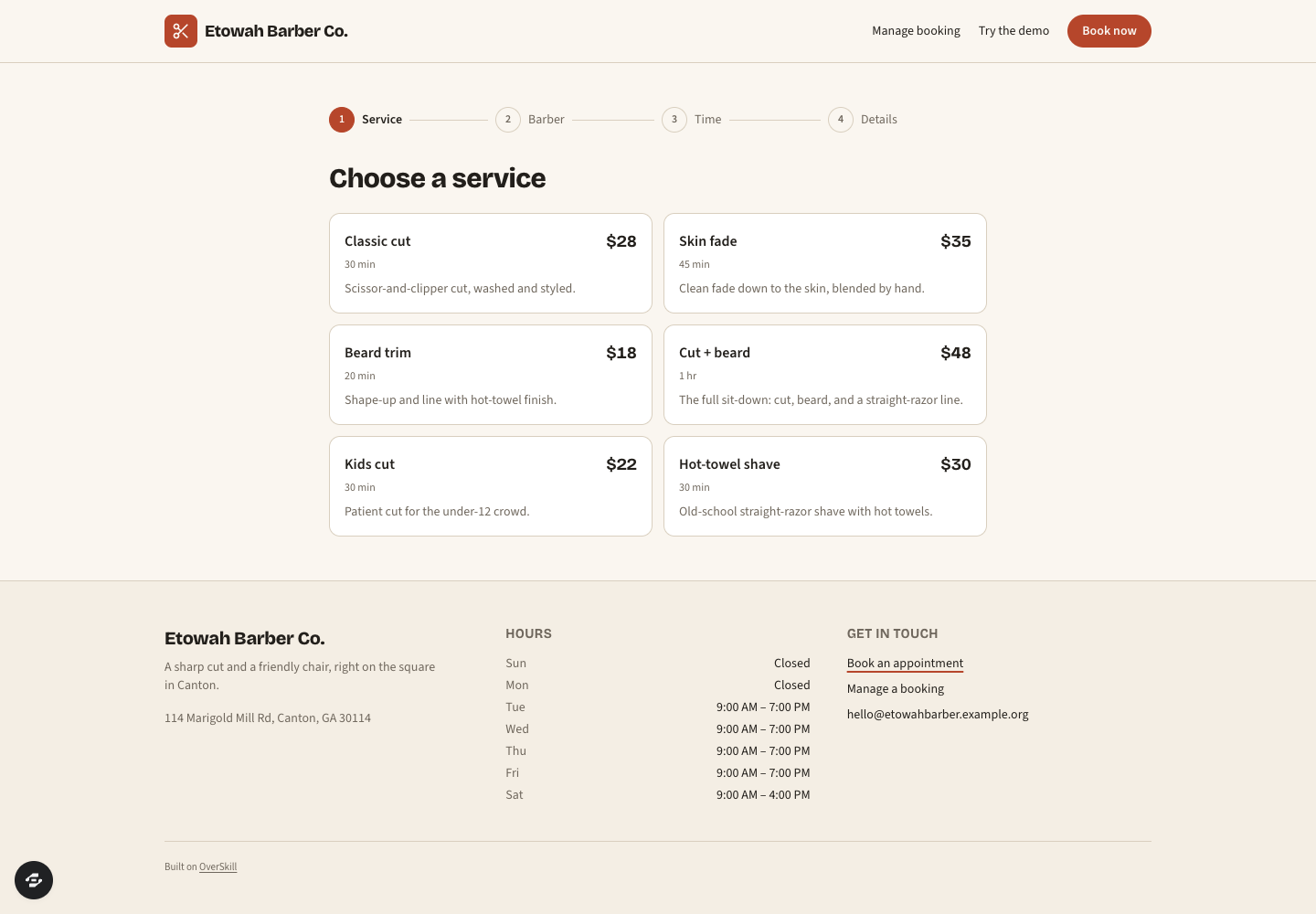
For a straightforward appointment, a useful starting sequence is service → staff → time → details → confirmation. The first four stages are visible in the Bookslot preview linked below. Confirmation, storage and real scheduling rules still need implementation and testing in your configured app.
For a consultation, change the promise: request → staff review → proposed visit → customer confirmation. A request must not appear as a confirmed appointment while someone still needs to assess it.
Keep those paths distinct. A customer should know whether they have reserved a time or asked the shop to contact them. Use that distinction in the button, the result screen and any message you configure.
Put the shop's rules into records
Imagine a fictional shop, Cedar Chair, starting with two stylists and one shared wash basin. It offers a dry cut and a wash-and-cut. Here is the brief its owner could give a builder; these are proposed requirements, not features verified in the Bookslot demo.
Scroll horizontally to compare all columns.
| Record | Store explicitly | Why it changes the booking flow |
|---|---|---|
| Service | Name, customer duration, cleanup duration, eligible staff, required resource | Two similarly named services can consume different amounts of staff and equipment time |
| Staff member | Working windows, breaks and supported services | A free calendar slot alone does not mean that person can deliver the selected service |
| Shared resource | Resource ID and the interval it is occupied | Two free stylists cannot use the same basin at the same time |
| Appointment | Service, staff, start, end, resource allocation and status | Availability must reflect the same records the front desk changes |
| Request | Requested service, contact details, owner and review status | A consultation request stays separate from a confirmed appointment |
Do not assume the basin is occupied for the entire visit. State the actual interval your shop needs. If a 60-minute treatment uses it only for the final 15 minutes, write that as a rule to implement and test. If you cannot define the interval yet, start with staff-reviewed requests while you work it out.
The salon booking-day worksheet works through service time, cleanup, breaks and eligible starts. Use that arithmetic before adding shared equipment or more complicated treatment stages.
A brief you can adapt before building
Use the composer above with this scope, replacing the example shop and rules:
Build a mobile-friendly booking app for Cedar Chair, a fictional single-location salon. Customers choose a service, an eligible stylist and an available time, then review the appointment before submitting their details. Keep customer time and cleanup time separate. Staff can review consultation requests without marking them confirmed. Store the rule inputs and appointment status explicitly. Give staff a daily view with breaks and unconfirmed requests clearly labeled. Start with sample data. Include a checklist for saved records, conflicting requests, permissions, cancellations and the confirmation result. Show any connection that still needs configuration before using real customer data.
Keep the first version small enough to check with your team. Add deposits, calendar sync or reminders only after naming the provider, its required setup and what should happen when an action fails. A “sent” label should depend on the actual delivery result you can observe, not just a button click.
Check the handoffs before taking bookings
Use sample people and a separate staff account. You are checking what the app actually saves and permits, not whether its screens look complete.
- Two customers, one time: submit competing requests for the same staff and resource interval. Define which one may confirm and what the other customer sees.
- A staff change: move an appointment and refresh the customer and staff views. The previous time should follow your cancellation or rescheduling policy.
- A request that needs review: keep the result screen and staff queue in the same state until a staff member accepts it.
- A return visit: close the browser, return and verify the saved appointment with the intended account. Check that another customer cannot see its details.
- A failed connection: use the provider's supported test method to check a failed payment or message. The appointment must not imply a success you did not observe.
The service booking guide covers the build sequence. The private-record access guide helps you test customer boundaries. Once the first journey works, use the launch checklist before sharing it with clients.