

A useful service-booking app lets a customer choose a service, reserve an available time, and manage that appointment later. Build that loop around your staff's working hours, service durations, and cancellation policy. A calendar that looks full or empty is only the beginning.
Start with one location and a small service list. This guide gives you a worked availability rule, a copyable adaptation brief, and eight checks to run in your own test app before inviting customers.
A real starting point · Bookslot
Start with a booking flow you can inspect.
Bookslot’s public preview separates choosing a service, a member of staff, a time, and contact details. Use that sequence to make your own booking rules concrete.
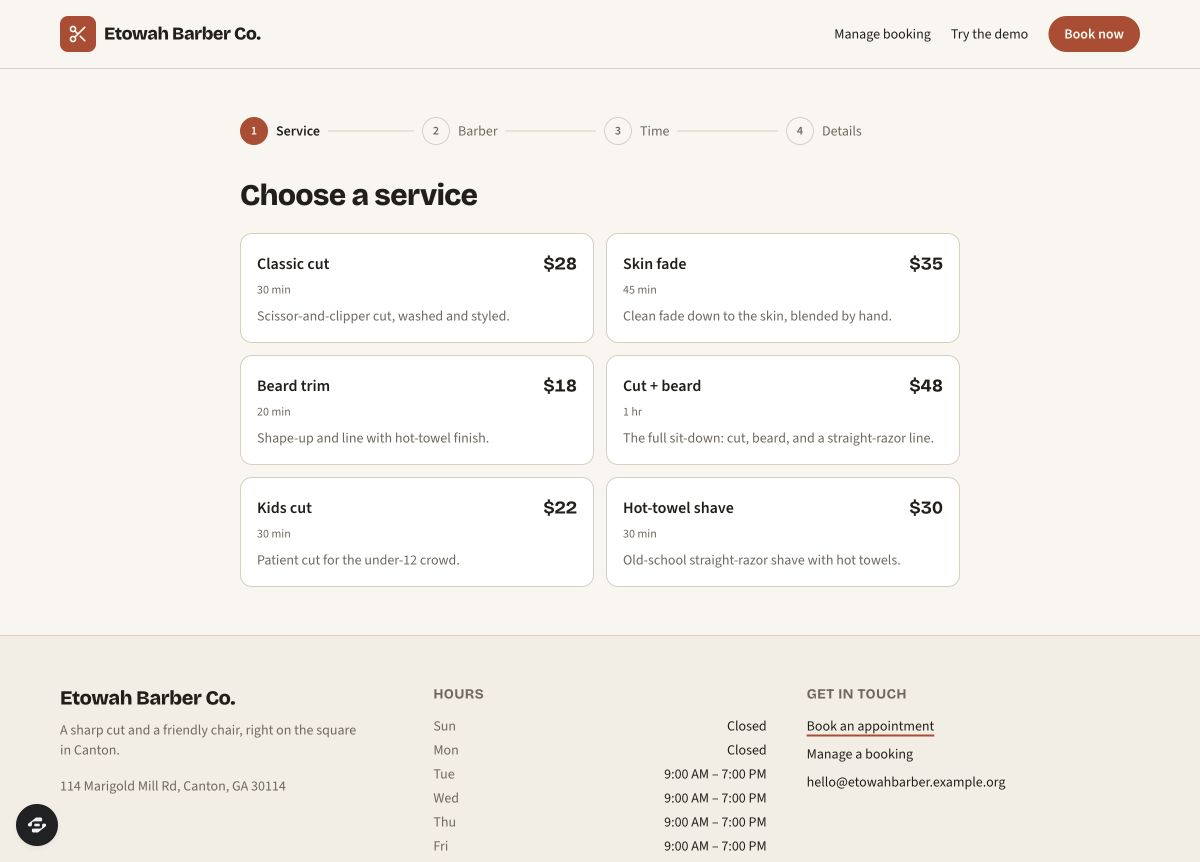
An actual public preview capture from September 9, 2026. The business, services, prices and schedule are example content. We reached the empty details form without submitting a booking; saving, confirmation messages and conflict handling remain unverified.
Preview captured · Open live preview · View full-size imageWhat to inspect
- Separate service from timeA service’s duration affects which appointments fit. Decide whether cleanup time also keeps the staff member busy.
- Make the choices specificDefine who can deliver each service, when they work, and how an ‘any staff member’ choice assigns the booking.
- Adapt the student starterThe preview asks for a school email. Replace that requirement and sample business details to match your intended customers.
The public remix page continues through signup or sign-in. Check your account access and credits before creating a copy. Current plans and credits.
Inspect the journey before copying the template
Bookslot is a published starting point with Service, Barber, Time, and Details steps. In the public preview on September 9, 2026, we selected Classic cut ($28, 30 minutes), Marcus, Thursday September 10 at 10:00 AM, then reached the unsent Details screen. That establishes the visible selection journey; no booking was submitted.
Bookslot is a DECA/student starter. Its sample business, prices, people, and school-email wording need review when you adapt it for a real business. The catalog describes in-person payment. Confirmation delivery, saved appointments, cancellation, rescheduling, and competing bookings remain unverified by this walkthrough.
Use the preview to decide what your customer needs to see at each step. Carry the service, staff member, date, time, and price into the final review. Let people go back to correct a choice without losing everything else.
Define the records behind the calendar
Keep one appointment record as the source for the customer's confirmation and the owner's agenda. Changing an appointment should update both views.
Scroll horizontally to compare all columns.
| Record | Useful starting fields | Who needs access? |
|---|---|---|
| Service | Name, duration, cleanup time, displayed price, active status | Public details; staff edit |
| Staff member | Name, services offered, working hours, days off | Public booking details; authorized staff edit |
| Appointment | Service, assigned staff, customer, agreed price, start, end, occupied-until time, status | Its customer and authorized staff |
| Customer | Name, contact details, authorized appointments | That customer and authorized staff |
Choose a business timezone and show it beside appointment times. Store each appointment as a precise moment with enough timezone information to display it correctly. A customer's phone being in another timezone must not silently move their booking.
“Any staff member” also needs a rule: assign one eligible, available person when reserving the appointment. It should not create an unassigned booking that several staff calendars count as available.
For a class with one shared seat limit, work through the workshop seats and waitlist exercise. It covers whole groups, temporary seat holds and the counts after a cancellation.
Make duration and cleanup part of availability
Here is a proposed schedule, not an observed Bookslot rule. A service lasts 30 minutes and needs 10 minutes of cleanup. An existing appointment starts at 10:00 and ends at 10:30, so that staff member remains occupied until 10:40.
Your picker offers starts every 15 minutes. 10:30 is invalid; 10:45 is a candidate, provided the staff member is working and the new service, including its cleanup, fits without another conflict. A 15-minute grid does not mean every service takes 15 minutes.
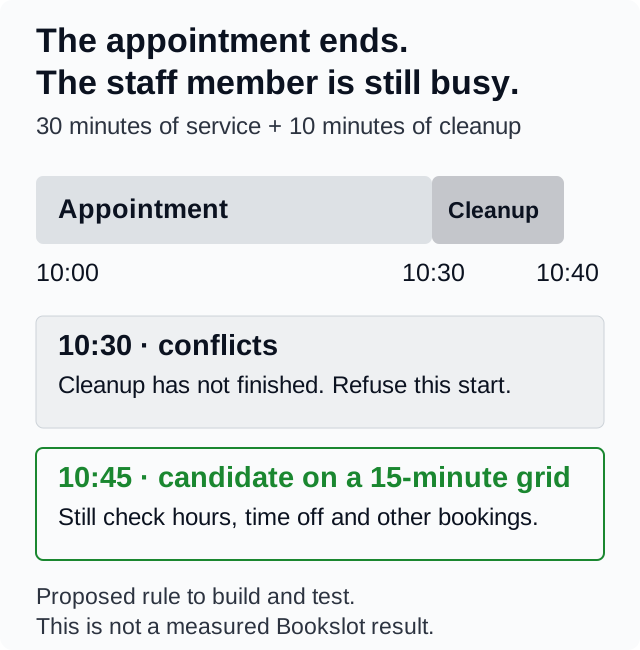
Open the full-size availability map to share this rule with the person reviewing your app.
Check the entire occupied period against existing appointments, time off, and working hours. Decide whether cleanup must finish before closing; this example assumes it must. A longer service may need to hide starts that a shorter service could use.
The final reservation must check availability and save the appointment as one protected action on the server. Otherwise, two customers can both see “available” before either booking is saved. Ask for exactly one confirmation when two requests compete for the same staff and occupied period. The other customer should get an honest conflict message and refreshed choices. Disabling a button helps with accidental clicks, but cannot enforce this rule across two browsers.
Decide what changing a booking means
Write a cancellation and rescheduling policy before adding the buttons. For a first pilot, you might allow either action until two hours before the appointment, then direct customers to contact the business. This is a policy example; choose a cutoff that fits your service and explain it before confirmation.
For a reschedule, check and reserve the replacement time before releasing the original, as one protected change. If the new time is no longer available, keep the original appointment and explain what happened. Do not leave the customer with neither booking.
For cancellation, retain the canceled record for the authorized owner's history. Decide whether the released time becomes bookable immediately. Repeat clicks should leave one canceled appointment, not send repeated messages or recreate a reservation.
Decide how customers prove they may manage a booking. Test with two clients: client B must not see client A's contact details or change A's appointment through a list, direct link, or edited request. Hiding the owner's dashboard is insufficient. A booking reference by itself is not proof that the person entering it owns the booking.
If you are replacing an existing booking process, use the booking cutover exercise to account for cancellations, reschedules and new appointments accepted after a snapshot. Its fictional journal makes the one-writer policy and hold decision explicit before a real switch is considered.
Keep payment and messages explicit
Start with Bookslot's documented pay-in-person model if that matches your business. Clearly show the amount due and when it is paid. A displayed service price is not evidence of an online charge.
If you add deposits or online payment, use the provider's supported test mode. Define when a slot is held, when that hold expires, and what happens if payment fails or arrives late. Verify payment and appointment states together before charging customers.
Likewise, a confirmation screen and a delivered email are separate results. Test the configured sender, recipient, retry behavior, and delivery in your own copy before promising email confirmations. Include a way to find an appointment again if a message never arrives.
Copy a brief for your first version
Use this as a change request after inspecting the template. The schedule and policy below are proposed requirements, not a description of features already verified in Bookslot.
Adapt Bookslot into a single-location service-booking app.
Replace student, school-email, business, staff, and contact placeholders.
Use clearly labeled sample customers while testing.

Start with two staff and two services. For the worked service, allow
30 minutes plus 10 minutes of cleanup. Offer starts every 15 minutes.
Use America/New_York as the business timezone and display it clearly.
Respect staff eligibility, working hours, time off, and occupied periods.
Assign one available staff member when a customer chooses Any staff.

Check availability and save a reservation as one protected server action.
Competing requests must not confirm overlapping appointments for one staff
member. Repeating a submission must not create another appointment.

Let customers cancel or reschedule until two hours before their appointment.
Keep the original booking if a reschedule fails. Release a canceled slot
immediately under this pilot policy. Check customer ownership on every read
and change; authorized staff may manage the appointments they support.

Start with in-person payment. Do not charge cards or send external messages.
Show saved confirmation details and a way for customers to return securely.
List setup still required and report each test as passed, failed, or unverified.
Personalize it with the brief builder, then open the Bookslot remix page. Creating your copy continues through the existing signup or sign-in and access steps. Check current plans and credits; opening a preview does not establish free building or completed setup.
Run eight checks in your own test app
Use an authorized copy and sample data. The Expected column defines the behavior to test; Observed remains Unverified until you record an actual result. Download the editable booking worksheet to capture evidence and follow-up work.
Scroll horizontally to compare all columns.
| Check | Expected | Observed |
|---|---|---|
| Duration and cleanup | The worked 10:30 start is refused; 10:45 is offered only if the full occupied period fits. | Unverified |
| Competing submissions | Two sessions choosing the same staff/time produce one appointment; retries do not duplicate it. | Unverified |
| Hours and timezone | Closed periods are unavailable; the same appointment remains the same moment across timezone displays. | Unverified |
| Save and return | Confirmation matches the saved appointment after refresh and a new authorized session. | Unverified |
| Reschedule conflict | A taken replacement is refused without losing the original; a valid change leaves one appointment. | Unverified |
| Cancellation | The cutoff is enforced, history remains, and slot release follows the stated policy. | Unverified |
| Two-client privacy | Client B and signed-out visitors cannot read or change client A's private booking. | Unverified |
| Confirmation and optional payment | Messages and charges, if enabled, match the appointment; failures and retries have verified outcomes. | Unverified |
Keep failed cases visible and fix them before a customer pilot. Use the full launch checklist for mobile, accessibility, recovery, and connected services. If you are still choosing a builder, run the same booking brief with the comparison guide. Compare completed journeys and repair work, not the first attractive calendar.
Watch the preview tour
The silent tour below moves through four real preview captures, from the service list to the empty details form. Turn on English captions or read the text equivalent. Use it to inspect the interface before deciding what to change in your copy.