

A group cancellation can free several workshop seats at once. Decide who receives those seats, how long an offer lasts and whether groups may split before an app starts accepting reservations.
This exercise follows one fictional twelve-seat workshop from a partly full session to a full one. Use the editable seats and waitlist worksheet to replace the sample policy with your own, then check the resulting counts.
Keep all twelve seats in the count.
Maple Room · Fictional workshop ledger
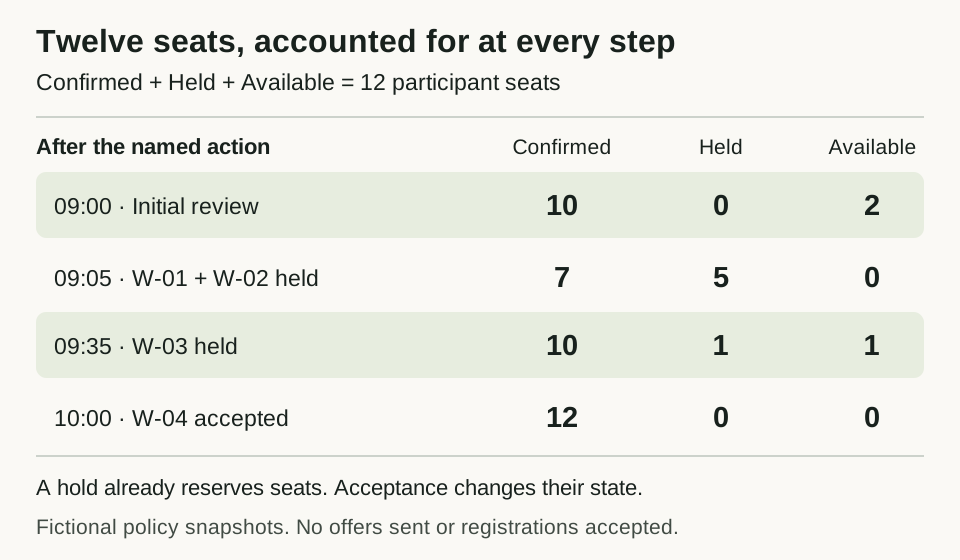
Selected states from the fictional Maple Room ledger. Confirmed, held and available seats always sum to twelve; these are policy calculations, not observed registrations or sent offers.
Open full-size seat ledgerSet the capacity and group policy
The fictional Maple Room workshop takes place on October 16, 2026. The organizer has chosen twelve participant seats for this exercise, with the instructor outside that participant count. This is an example allocation limit; it does not establish a venue's allowed occupancy. All transactions below occur on October 9, 2026, America/Chicago.
Use these rules throughout the example:
| Decision | Sample policy |
|---|---|
| Party size | A whole number from 1 through 12 |
| Groups | Keep each group together; never offer part of its requested size |
| Waiting order | Oldest received time first; break ties using an immutable queue sequence assigned when the request is saved |
| Oldest group cannot fit | Stop. Leave seats available until it fits or leaves the queue; do not skip it |
| Promotion | Move the oldest group from Waiting to Held and reserve its whole party size |
| Hold duration | Thirty minutes from promotion |
| Acceptance | Allowed before the hold's expiry; at the expiry time it is too late |
| Expiry | Release held seats once. The expired group leaves the active queue; rejoining receives a new position at the end |
| Cancellation | A waiting group leaves the queue without releasing seats. Release a held or confirmed group's seats once; retain the cancellation history |
A waiting group may withdraw by cancelling its request. It leaves the active queue but releases no seats, because none were reserved for it. The next group then becomes eligible for review.
This strict order can leave seats unused. An alternative policy could offer seats to the oldest group that fits, but it would produce different results. Choose and communicate one policy before registration; the calculations here use strict order.
Count seats by reservation state
A waiting group has no seats reserved. A hold does reserve seats, even before the group accepts. Confirming a held reservation changes its state without consuming the seats a second time.
| State | Seats counted against capacity |
|---|---|
| Waiting | 0 |
| Held, before expiry | Whole party size |
| Confirmed | Whole party size |
| Cancelled or Expired | 0 |
At each step, available seats = 12 − confirmed seats − held seats. Resolve any holds that have expired before making the next allocation, and keep the release and its history together. The three seat counts must always add to twelve; none may be negative.
The table is a policy for a future app to implement and test. It is not a claim that an Overskill template already manages group waitlists, timed holds or cancellation retries.
Begin with two available seats
The starting reservations are:
Scroll horizontally to compare all columns.
| Reservation | Party size | State |
|---|---|---|
| A | 4 | Confirmed |
| B | 3 | Confirmed |
| C | 3 | Confirmed |
Ten seats are confirmed, none are held, and two are available. Three groups are waiting:
Scroll horizontally to compare all columns.
| Request | Party size | Received | Queue sequence |
|---|---|---|---|
| W-01 | 3 | 08:50 | 1 |
| W-02 | 2 | 08:51 | 2 |
| W-03 | 1 | 08:52 | 3 |
At 09:00, W-01 cannot fit into two seats. The organizer offers no seats. W-02 could fit, but moving it ahead would violate the chosen policy. A useful waitlist view should explain the reason: “Two seats available; the oldest group needs three.”
Follow a cancellation through two holds
At 09:05, B cancels its three-person reservation. Seven seats remain confirmed, so five are now available. W-01 receives a three-seat hold, then W-02 receives a two-seat hold. Both holds expire at 09:35. W-03 continues waiting.
Each row below is the state after the named action. The two promotions at 09:05 are ordered actions, as shown.
Scroll horizontally to compare all columns.
| Time | Action | Confirmed seats | Held seats | Available seats |
|---|---|---|---|---|
| 09:00 | Initial review; W-01 cannot fit | 10 | 0 | 2 |
| 09:05 | B cancels | 7 | 0 | 5 |
| 09:05 | Hold three seats for W-01 | 7 | 3 | 2 |
| 09:05 | Hold two seats for W-02 | 7 | 5 | 0 |
| 09:20 | W-01 accepts its hold | 10 | 2 | 0 |
| 09:35 | W-02's hold expires | 10 | 0 | 2 |
| 09:35 | Hold one seat for W-03 | 10 | 1 | 1 |
| 09:50 | W-03 accepts its hold | 11 | 0 | 1 |
The 09:20 acceptance transfers three seats from Held to Confirmed. It does not reduce availability again. At 09:35, W-02 is too late to accept under this policy. Expiry releases two seats, and repeating that expiry must not release them a second time. W-03's new hold expires at 10:05, so its 09:50 acceptance is within the window.
The example records holds and acceptances as fictional transactions. It does not send offers, establish delivery of a message, take a payment or represent real attendee activity.
Decide who gets the last seat
At 09:55, two new one-person requests arrive with the same recorded time. W-04 has queue sequence 4; W-05 has sequence 5. W-04 receives the last available seat as a hold expiring at 10:25. W-05 waits.
Scroll horizontally to compare all columns.
| Time | Action | Confirmed seats | Held seats | Available seats |
|---|---|---|---|---|
| 09:55 | Hold one seat for W-04; W-05 waits | 11 | 1 | 0 |
| 10:00 | W-04 accepts | 12 | 0 | 0 |
| 10:01 | B's cancellation is received again | 12 | 0 | 0 |
The final confirmed parties are A: 4, C: 3, W-01: 3, W-03: 1 and W-04: 1. Together they occupy twelve seats. B is cancelled, W-02 is expired and W-05 remains waiting without a seat.
A repeated cancellation for B must return its existing cancelled state. It cannot turn a full workshop into a session with three available seats. Likewise, two simultaneous promotion attempts for the last seat must create only one valid hold. The app needs to check the current queue and capacity together when saving that decision. A disabled button or a previously displayed seat count is not evidence that this works.
Use the ledger as a test plan
Keep a reservation ID, party size, state, original queue position, hold expiry and a history of state changes. Give each cancellation, acceptance and expiry operation a stable identifier so a retry can be recognized. Preserve the earlier state and the time of the change; don't erase the cancellation to make the current count look right.
Start testing with the worksheet's full transaction ledger, then check these cases:
- An empty session has twelve available seats. A party of twelve can receive one hold; a party of thirteen, zero, a negative number or a fraction is rejected.
- An older three-person party blocks a newer two-person party when only two seats remain under this policy.
- Cancelling waiting W-01 at the initial 09:00 state leaves the seat counts at 10 confirmed, 0 held and 2 available. W-02 can then receive a two-seat hold; W-03 remains waiting. Repeating W-01's cancellation changes nothing.
- A hold can be accepted just before expiry but cannot be accepted at or after expiry. Preserve the full time: a 09:05:30 promotion expires at 09:35:30.
- Two attempts to claim the final seat produce one hold, with the other request still waiting. Run this with separate sessions against the same saved data.
- Repeating the same cancellation or expiry leaves the counts unchanged.
- Returning to the app shows the same reservations, queue positions and history. Unauthorized viewers cannot read or change attendee records.
The worksheet's expected arithmetic can be checked on paper. Save/reload, simultaneous updates, time handling and access control require tests in the app you build; this guide does not report those tests as passed.
Put the policy into a build brief
The service-booking guide covers staff schedules and appointment intervals. This workshop uses one shared capacity pool and whole-party allocation. Keep those requirements explicit when you write the app brief.
Build a workshop registration test app using my completed worksheet.
Use twelve fictional participant seats, whole groups and strict queue order.
Implement Waiting, Held, Confirmed, Cancelled and Expired states.

Show confirmed, held and available seats separately. Reserve seats during
holds, enforce the thirty-minute expiry and record every state change.
Resolve expired holds before allocation. Preserve queue order and prevent
repeated operations from releasing or reserving seats twice.

Use the worksheet's initial reservations and transaction sequence.
Test the last-seat conflict with separate sessions and report the evidence.
Use sample data. Do not send messages, take payments or open registration.
Report passed, failed and unverified checks plus remaining setup.
Review current plans and credits before building. Use the private-record access checks and launch checklist before making a real registration page available. An accurate planning ledger is the starting point for that work.