

Choose an AI app builder by completing the same small task in each product: a client signs in, saves a request, returns later, and sees the right result. Then change the app, check another client's access, and find out what you can recover or hand over.
Product sources reviewed September 9, 2026; worksheet tool added September 10. Overskill publishes this guide. Product capabilities below come from linked official documentation, not a hands-on speed or quality benchmark. Record your comparison in this page, or use the editable evaluation worksheet. Both start with every result Not tested.
A real starting point · Quarry
Compare one journey you can describe precisely.
Use a client portal as the common exercise: a client submits a request, returns to see it, and follows its status. Quarry gives you a real example board to inspect before writing the same brief for your shortlist.
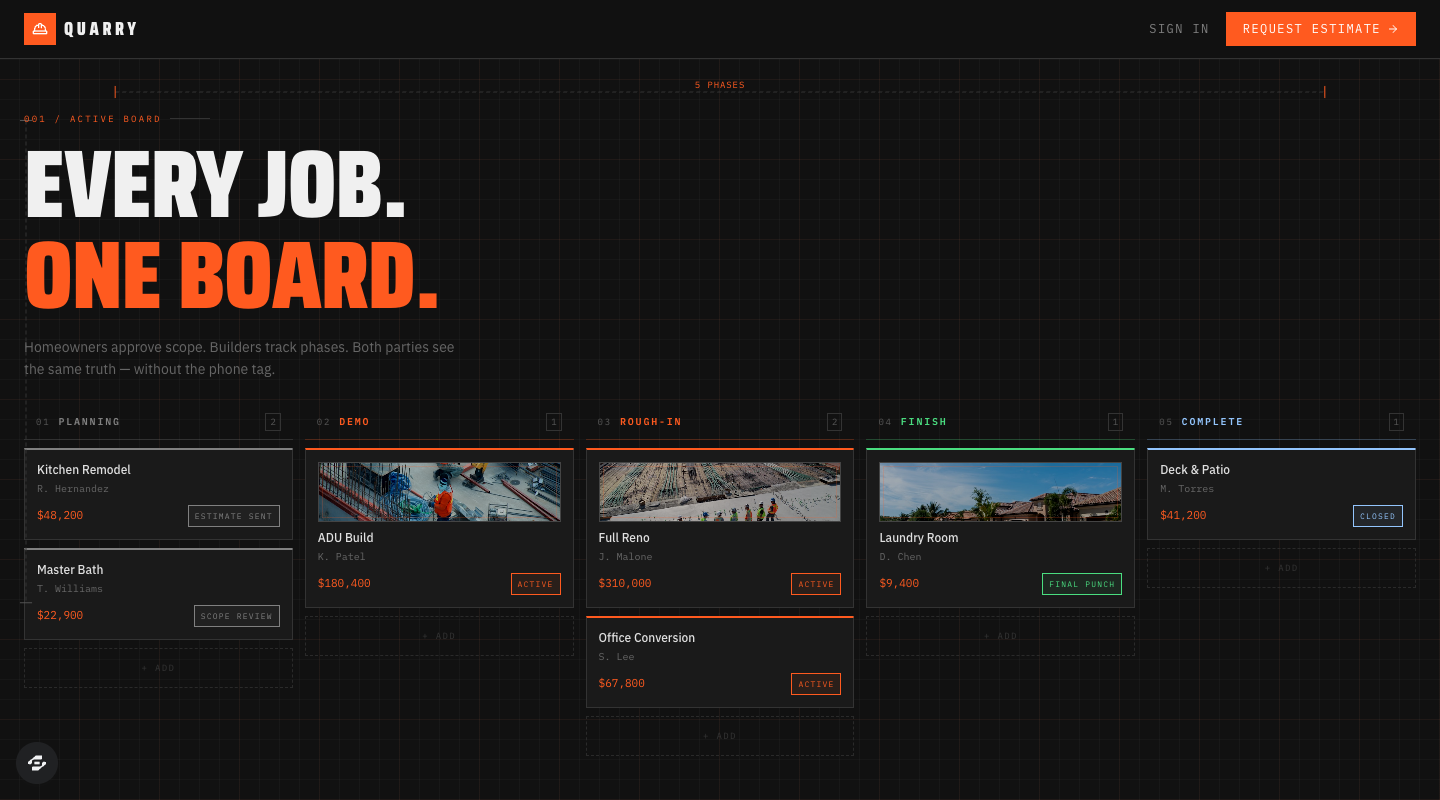
Quarry’s public preview shows illustrative project cards and statuses. It is an example interface, not evidence of private access or saved requests, and not a benchmark result for Overskill or another builder.
Preview captured · Open live preview · View full-size imageWhat to inspect
- Use the same recordsGive every product the same two fictional clients, request titles, permissions, and status-change requirement.
- Record the starting pointA remix and a blank project inherit different work. Note the template, plan, date, and follow-up prompts.
- Compare observed behaviorSave and return, test private access, then make a change and repeat. Keep repair effort and untested results visible.
The board is publicly viewable. The remix page continues through signup or sign-in; check your account access and credits before creating a copy. Current plans and credits.
Choose a workflow before a product
Our common exercise is a client project portal. The published Quarry example above illustrates a possible starting point; its screenshot does not establish that it passes these tests. Decide whether to remix a starter or build from scratch, and record that choice for every product.
If your business needs appointments instead, use the service-booking guide and worksheet as a separate comparison track. Give every shortlisted builder that same booking brief. Do not compare a completed portal with an unfinished booking app.
What each product documents
Use these capabilities to choose a shortlist, then test your own requirements.
| Product | Starting point to evaluate |
|---|---|
| Overskill | Describe an app or adapt a published template. An export ZIP can contain app files plus table data in SQL and JSON formats. Check included records and required services; an export is not a tested migration. Export guide. |
| Lovable | Documents managed hosting, data and sign-in, plus GitHub/GitLab sync and migration options. Check which services you would need to reconnect. Ownership and hosting. |
| Bolt | Documents hosting, databases, sign-in and file storage, plus project ZIP downloads and GitHub workflows. Test the saved records as well as the screens. Bolt Cloud, project tools. |
| Replit | Documents an AI development workspace with Git/GitHub version control and Agent checkpoints. Test what a checkpoint restores in your selected environment. Version control. |
| Cursor | Its coding agent works with a codebase, edits files, runs commands and uses browser tools. Consider who will maintain the code and arrange the app's services. Agent overview. |
Use one brief and two fictional clients
Copy this brief into each shortlisted product. Use a disposable test app and test accounts you control. The names and records below are fictional.
Build a small client project portal.
Clients sign in, create a request, and see only their own requests.
An administrator sees both clients' requests and changes their status.

Request fields: title, brief, requester, status.
Statuses: Submitted, In review, Completed. Start at Submitted.
Clients cannot change the requester or status.
Check permission for every record read and change, including direct links.
Show empty, loading, validation and save-failure states.
Do not connect payments or send external notifications yet.
Explain required setup and how to test each role.
Scroll horizontally to compare all columns.
| Test identity | Request title | Brief |
|---|---|---|
| Maya Chen — client A | Launch brochure | A two-page brochure for a fictional studio. |
| Luis Rivera — client B | Event poster | A poster for a fictional community event. |
Use Jordan Blake as the administrator. These are roles for your test accounts, not existing accounts in any template. Record the product, date, plan, selected model, template, follow-up prompts and manual setup in the worksheet. Different starting points may suit you; make the difference visible.
Build, change, check access, then recover
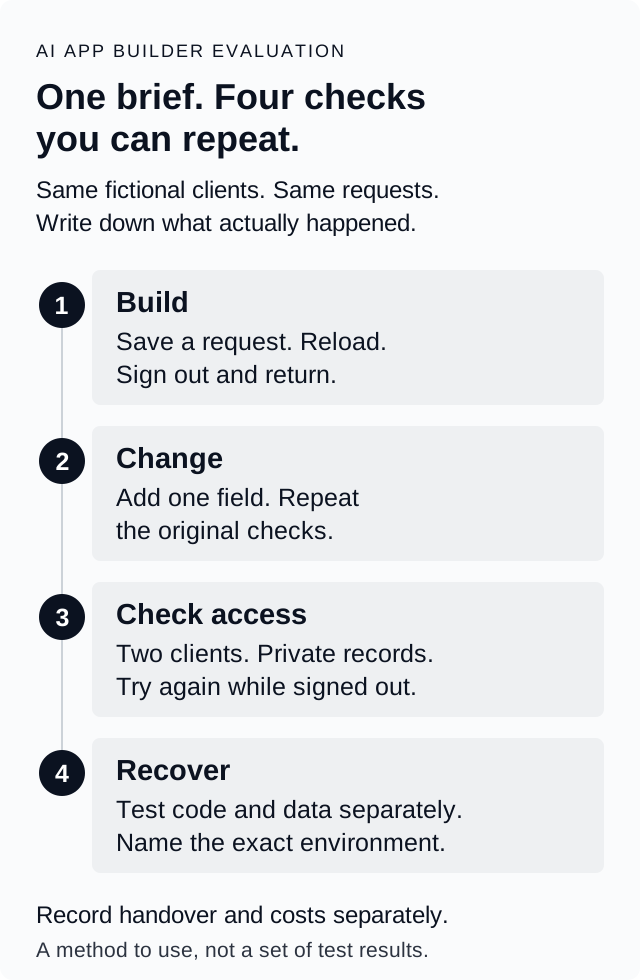
Build. Each client submits their own request. Reload, sign out and return in a new session. Both records should remain, with the original text and correct owner. Jordan changes only Maya's status to In review. Luis's stays Submitted. Save this state as Baseline A using the product's documented options, recording what was actually saved.
Change. Ask every builder to add a Priority field with Normal as the default and Urgent as the other choice. Only Jordan can change it. Set Luis's request to Urgent, reload, then repeat the original submission, status and access checks. Record repairs and follow-up instructions.
Access. From Luis's session, try Maya's direct request link and an unauthorized change. Repeat in the opposite direction and while signed out. Private content must remain unavailable and records unchanged. Check enforcement beyond hidden buttons; get technical help for direct-request checks if needed.
Use the worksheet's separate Expected, Observed and Status fields. A screenshot supports what it shows; it does not prove persistence, permissions or recovery. Repeat the journey on a phone.
Test code recovery, data recovery and handover separately
Use separate disposable copies for these checks so one restore does not erase another test's evidence.
Code recovery: return to the pre-Priority version and check the original screen and workflow. Record what happens to the records; do not assume they rewind with the interface.
Data recovery: start from Baseline A, change Luis's status to Completed, then use a documented data-recovery method. The target is Maya In review, Luis Submitted, both briefs intact and each owned by the correct client. Name the database and whether it is for development or production. If no suitable recovery method is established, leave this Not tested and record the blocker.
The distinction matters. Bolt's version history leaves the current database unchanged. Replit's rollback guide makes development-database restoration optional; production-data restoration is separate. Overskill's app-version restore is not a backup of customer records. None of these descriptions proves that your own recovery has succeeded.
Handover: run a copy in the destination you intend to use, restore the two sample records, reconnect required services and repeat both clients' access checks. Inventory code, records, uploaded files, sign-in, payments and domain settings separately. For example, duplicating your own Bolt project copies a Bolt database's structure without its records. Downloading files alone does not complete a move.
Check payments before adding them
Keep payment evaluation separate from the portal exercise. First record the intended provider, eligible plan, account permissions and required setup. Use a provider-supported sandbox when available. If you cannot establish a safe test mode, leave payment execution Not tested. List what remains before live use; sandbox results do not prove live processing.
Lovable's payment documentation requires Pro or higher for built-in payments, while describing a separate own-Stripe option for free plans. Payment-enabled projects cannot be remixed or forked. Its customer portal must be tested outside the iframe preview. Check those boundaries before selecting a reusable starter.
Replit's Stripe integration requires a paid Core or Pro plan and an app with backend functionality. Test mode and activating live payments are separate steps.
Apply the same questions to Overskill and any other candidate. Check your account's eligibility and current plan requirements; this guide does not verify account-specific payment availability. Overskill's zero-dollar test checkout follows a real purchase and access flow, not an isolated sandbox. Where a safe sandbox is available, check success, cancellation, failure and resulting access. Keep live charges and customer data out of this exercise.
Choose from the evidence you collected
Keep Not tested visible. Use Pass only for an observed result, Fail for a mismatch, or Not applicable with a reason. Record build usage, hosting and provider fees separately, alongside repair effort and unresolved setup.
Choose the product that meets your essential checks and that you can maintain. There is no automatic winner or meaningful universal score here. Use the worksheet, adapt your requirements with the brief builder, and follow the launch checklist before inviting customers.
The in-page worksheet keeps two candidates beside the same nine tests. Mark your essential checks, record what you observed and export the next steps. Entries stay in this page only; copy or download them before leaving. Your notes are self-reported results, not tests performed by Overskill.