

Use Overskill MCP to turn a reviewed brief into an app, inspect build status and request changes. Test the preview in a browser, repair specific failures, then publish and check the public result. Connect, brief, build, test, repair and hand over is a repeatable process for client work.
MCP is the connection that lets your assistant use Overskill's tools. The two chiropractic demonstrations show this process with fictional data and recorded checks. Creating or updating a build requires account access and credits; review current pricing before starting.
Keep the checks in the workflow.
From a testable brief to a useful handoff
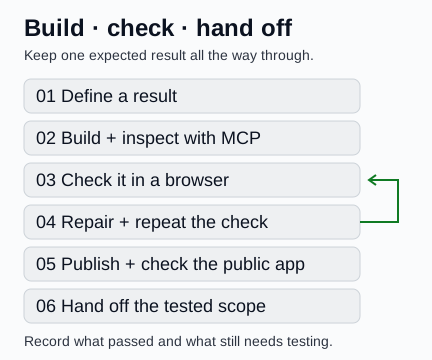
A workflow to repeat with your own app. MCP handles builds and publication; a person or separate browser tools must check what the app actually does.
Open full-size workflow mapConnect and check the workspace
Open Connect Overskill, follow the instructions for your assistant, and complete the normal sign-in. If your host requests a server URL, use https://mcp.overskill.com/mcp.
Confirm the connected workspace and available tools. get_balance reads the team's balance and plan information; list_apps finds apps the connection can access. A successful read does not establish permission to create. Resolve missing access before starting a build.
This guide uses the hosted MCP connection. Keep credentials out of the brief and use your assistant's supported connection flow.
Choose a client job you can test
Start with the record a person needs to create or change. The table offers five possible recipes. Only the linked chiropractic demonstrations have the observations described in their case study; new client adaptations and the other concepts still need building and testing.
Scroll horizontally to compare all columns.
| Recipe | Concrete record | A useful first test | Example status |
|---|---|---|---|
| Business dashboard | A month with visits, collections and costs | Change one cost, save and reload; check profit and the report agree. | Related example: Growth demo. A new client version is unbuilt. |
| Client portal | A request with a client owner, status and reply | Client A saves a request; client B and a signed-out visitor cannot read or change it. | Unbuilt concept here; use the portal guide to plan it. |
| Proposal or configurator | A quote with quantities, unit prices and an agreed total | Change quantity and check the total; later catalog-price changes must not silently rewrite an agreed quote. | Configurator is an unbuilt concept. Partner's proposal preview and TXT download were checked separately. |
| Partner system | A professional contact, stage, event and next follow-up | Change the contact's stage, reload, and check the relevant counts and follow-up list. | Related example: Partner demo. A new adaptation is unbuilt. |
| Interactive lead-generation tool | A fictional project estimate with selected options and an optional contact request | Recalculate after one input changes; declining contact leaves the estimate usable and sends nothing. | Unbuilt concept; no leads or conversion result are claimed. |
For an existing starting point, inspect the Growth or Partner public remix page. Copying requires sign-in and account access checks; these links are not evidence of a tested clone. The steps below start a new app from a brief.
Write the expected result before building
Choose one user, one record and one change. Use the brief builder to organize them. This fictional Workshop brief is a proposed new demonstration, not another completed build.
Download the same editable Workshop brief.
App name: Community Workshop Planner

Build a public, fictional-data demonstration for a coordinator planning
workshops with local employers. The main job is to prepare an event,
record aggregate outcomes, and see its next follow-up.

An event has a partner, date, status, agreed fee, actual cost, attendee
count, inquiry count and consultation count. Keep contact examples
fictional. Do not collect patient records or send email or texts.

Include one completed example: fee $500, cost $300, 25 attendees,
10 inquiries and 4 consultations. Show contribution $200, cost per
inquiry $30 and consultation conversion 40% of inquiries.

Changing cost to $400 should change contribution to $100 and cost
per inquiry to $40 after saving and reloading. Reject inquiries above
attendees. Show n/a when a ratio has a zero denominator.

Label the demo data. Make reset explicit and require confirmation.
State where demo records are stored. Keep private client deployment
and external connections outside this first demonstration.
Start the build and keep its identifier
After reviewing the brief and credit access, use create_app with the brief as prompt. You can supply a name; this example also names the app on its first line. If choosing a model, inspect list_generation_models for available choices.
Keep the returned build_id. Use get_build to inspect progress and get_app for app details and available URLs. If the creation response is interrupted or uncertain, inspect the existing app or build before starting another copy.
Ready status tells you to inspect the result. Saving, calculations and permissions still need their own checks.
Use the preview and record what happens
Open the returned preview. Enter the fictional values, check the result, change one value, save and reload. Open the relevant page directly as well as through navigation.
Scroll horizontally to compare all columns.
| Check in your new app | Expected | Observed |
|---|---|---|
| Initial event | $200 contribution; $30 per inquiry; 40% consultation conversion | Not tested |
| Change cost to $400, save and reload | $100 contribution; $40 per inquiry; conversion remains 40% | Not tested |
| Enter 26 inquiries for 25 attendees | Clear validation; the invalid record is not accepted | Not tested |
You can operate the browser yourself or use your assistant's separate browser tools. A status response, screenshot or progress card does not perform these checks. Record the actual result and page address in the handoff worksheet.
Request a specific repair
When a check fails, use update_app with the same build_id. Describe the page, input, expected result and observed failure. Name the behavior to preserve. For example: “Saving cost $400 returns to $300 after reload. Preserve the event fields and calculations; fix the save-and-return journey.”
Updates are additional build work and may consume credits. After the update is ready, repeat the failed check and the original calculation. The chiropractic examples needed follow-up work on pages and exports before their final checks.
Publish the scope you checked
Review the preview and remaining gaps before approving publication. Use publish_app for the selected build. A queued deployment response does not mean the public site is serving it yet: inspect get_app for publication details, then open the production URL.
Repeat the important navigation and calculation checks there. Label preview and production results separately. A public sample-data demonstration can be ready to share while private account or connected-service acceptance remains unfinished.
Package the work someone else must operate
Give the next person a public URL, an exact demonstration path, expected-versus-observed results, known limitations and the next acceptance steps. Download the editable handoff and offer worksheet to agree proposed configuration, training, support and running costs separately.
Use the running-cost planner to compare your own low, base and high assumptions, keep unpriced services visible and separate recurring costs from setup work before agreeing that handoff.
| Work | What performs it |
|---|---|
| Create, update, inspect build status and publish | Overskill's connected MCP tools |
| Click, save, reload and inspect downloads | A person or separate browser tools |
| Calculate expected values and run focused code checks | The reviewer or assistant's analysis and local tools |
| Produce an offer document or PDF | Separate document-authoring work |
| Export a brief, proposal or CSV from the app | The app's implemented controls, which need a download check |
Finish with the launch checklist. Before a private rollout, test allowed and denied access with independent accounts and verify the agreed data, recovery and connected-service behavior.