

A worker was assigned. A worker arrived. The agreed work was completed. Those are three different facts. Your field-service app should let a dispatcher tell them apart without opening a message thread or guessing what a photo proves.
Start with one small service and write the evidence that would justify calling it complete. Then work through a successful visit and an access problem using the same record. The editable field-visit worksheet includes the filled example, blank records and an answer key.
This is a fictional planning exercise for Cedar Desk, a property-services team checking the setup of four office meeting rooms. It is a proposed service record, not a running field app, a property safety assessment or an inspection certificate. The names, observations and evidence references are invented examples.
Make completion and blockers readable.
Cedar Desk · Fictional room checks
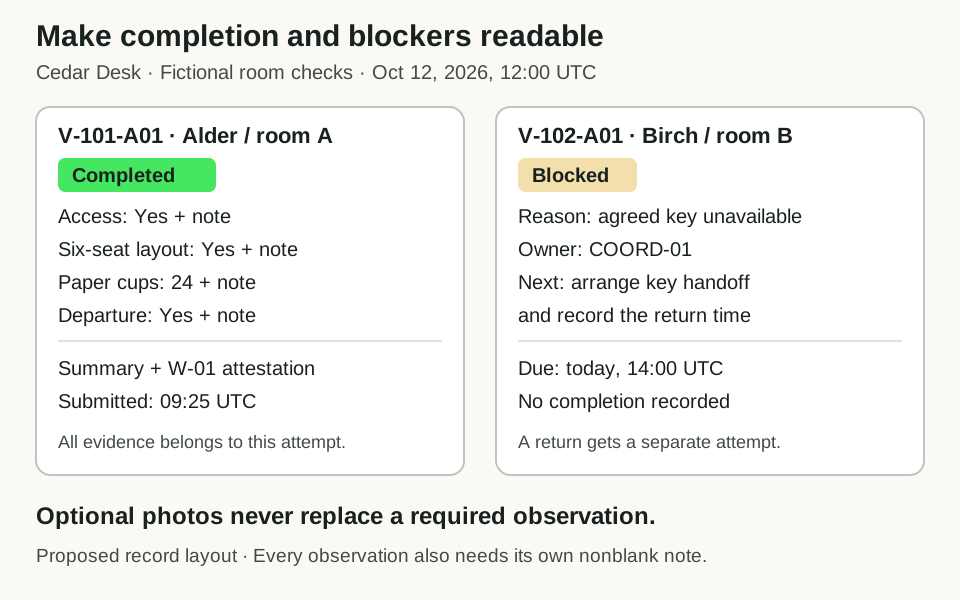
Proposed record layouts for Cedar Desk at October 12, 2026, 12:00 UTC. Completion needs evidence from the current attempt; a blocked visit keeps an owned follow-up. These are explanatory diagrams, not app screenshots.
Open full-size visit diagramGive each state a specific meaning
Cedar Desk's agreed task is narrow: obtain authorized entry, confirm a six-seat room layout against plan R1, count at least 20 paper cups and secure the room using the agreed closing procedure. The worker must record what happened. A scheduled time passing does not finish the visit.
Scroll horizontally to compare all columns.
| State | What the record establishes | What happens next |
|---|---|---|
| Assigned | A named worker has a site and planned time; no attempt has started. | The worker starts an attempt. |
| Attempted | The current attempt has started, but its completion record has not passed every requirement. | Record the missing observation, correct an unmet condition or explain a blocker. |
| Blocked | The current attempt cannot proceed, and a reason, follow-up owner, next action and due time are recorded. | The owner resolves that follow-up and records the return arrangement. |
| Completed | The current, unblocked attempt has all four passing observations with notes, a summary and the worker's dated attestation. | Retain the completion record and its history. |
These are mutually exclusive current states. A completed visit still has an attempt in its history. Count current states separately from total attempts so a return visit does not look like a second completed job.
Specify what counts as required evidence
Use stable names for the four required observations. A count of “four answers” is too loose: four copies of the same answer must not replace a missing departure check.
Scroll horizontally to compare all columns.
| Required item | Accepted completion value | Required note |
|---|---|---|
| Access | Yes | How authorized entry was obtained; exclude keys or access codes. |
| Layout | Yes | Confirm six chairs at the meeting table against plan R1. |
| Cups | A whole number of 20 or more | State the count and where the paper cups were counted. |
| Departure | Yes | State that the agreed closing procedure was completed. |
Every note must contain meaningful text. A blank, a space or “not applicable” does not waive an item in this example. Zero is a valid count to record, but it fails the 20-cup completion requirement. A layout answer of No remains an unmet condition even when the worker has attached a clear photo.
The worker also supplies a visit summary and confirms, “I recorded these observations for this attempt.” Keep that person's identity, the attempt start time and the submission time together. This attestation describes the work recorded; it does not certify the property's safety or prove that an observation is truthful.
Optional photos are supporting context. Keep them separate from the required observations. Their presence cannot fill an empty answer, turn No into Yes, increase the cup count or replace the worker's attestation. This exercise uses a fictional photo label; it does not contain or test an uploaded image.
Reconcile four visits at noon
All times in the example use UTC. The first review is October 12, 2026, at 12:00. W-01 and W-02 are fictional worker identifiers; COORD-01 is the coordinator responsible for arranging access.
Scroll horizontally to compare all columns.
| Visit | Worker and room | Current record at 12:00 | State |
|---|---|---|---|
| V-101 | W-01, Alder / room A | Attempt A01 started 09:00. Access Yes, layout Yes, 24 cups and departure Yes, all with notes; summary and attestation submitted 09:25. | Completed |
| V-102 | W-01, Birch / room B | Attempt A01 started 10:00; the agreed key was unavailable. A blocker and owned follow-up were recorded 10:05. | Blocked |
| V-103 | W-02, Cedar / room C | Attempt A01 started 11:00. Access Yes, layout Yes and 20 cups have notes. Departure is missing; one optional photo label is present. | Attempted |
| V-104 | W-02, Dogwood / room D | Assigned for October 13 at 11:00; no attempt has started. | Assigned |
The answer is four visits and three attempts, with one visit in each state. Only V-101 is complete. V-103's completion request at 11:25 is rejected because departure evidence is missing. The existing observations stay intact, and no completion time is added.
V-101 demonstrates the smallest successful record. Its 24-cup observation passes the written threshold, all four notes describe the same attempt, and W-01 submits the attestation. A dispatcher assigning the room or changing a label would not supply any of that evidence.
Keep the blocked visit useful
“Couldn't get in” describes the problem but leaves the next person to reconstruct the work. Give V-102 a complete follow-up:
- Reason: the agreed key was unavailable; no authorized entry.
- Owner: COORD-01.
- Next action: arrange authorized key handoff and record the return time.
- Due: October 12 at 14:00 UTC.
- Resolution evidence: the property contact confirmed key handoff for October 13 at 09:00, recorded under fictional reference K-102.
The follow-up is due at 14:00 and overdue strictly after that instant. At 14:00:01 it is overdue. COORD-01 records the resolution at 14:30, so the follow-up was resolved 30 minutes late. Preserve that deadline and resolution time even after the open-work list stops showing it.
Resolving the access arrangement does not complete the visit. At 14:30, V-102 remains Blocked with its follow-up closed and return arranged. No one has yet obtained entry, checked the room or recorded departure on the return visit.
At 09:00 on October 13, W-01 starts V-102-A02. That attempt begins with empty observations. Attempt A01 retains its original blocker, deadline and resolution evidence. A delayed submission addressed to A01 must not complete A02 or replace its answers.
On A02, W-01 records authorized entry, the six-seat layout, 22 paper cups and the completed closing procedure, then submits at 09:25. At 10:00 there are still four visits, now with four attempts: two Completed, one Attempted, one Assigned and none Blocked. The return adds an attempt to V-102, not a new visit.
Make the worker's next action visible
The proposed mobile view needs the room, visit ID, attempt ID and current state near the top. Follow those with the four labeled observations and a short summary field. Keep an unmet requirement close to the action it prevents: “Record the departure check before completing this visit” is more useful than a generic error.
Offer a separate way to record a blocker. It should ask for the reason and the coordinator's owner, action and due time. A blocked visit should not disappear from the work list just because the worker has left the property.
Use the app design review to check reading order, labels, keyboard access and the next action on a phone. The diagram here is an explanatory layout, not a screenshot of a tested app. Design the page so the required text remains usable when no photo is added.
Write the rules for a repeated or incorrect submission
Give each action a stable reference. If the same action arrives twice with the same visit, attempt, worker, time and contents, the second copy should leave the record unchanged. If that reference arrives with different contents, flag the conflict instead of silently replacing the first action.
Validate the whole action before changing the record. A rejected completion request must leave the saved observations and state intact. A late action for an earlier attempt must not write into the current attempt. The worksheet includes these cases so the expected behavior is clear before implementation.
This example treats a completed visit as closed to further changes. It does not define cancellation, reassignment or correcting a completed observation. If your service needs those actions, write a separate correction process that preserves who changed what and why. Do not reopen completed work as a side effect of assigning a different worker.
Turn the record into a testable app brief
Carry the filled worksheet into the app brief guide. Ask for two worker accounts and a coordinator account using fictional sites. Specify who may assign work, record observations, resolve a blocker and see another worker's visit. The private-record access checks cover direct links and writes as well as visible buttons.
Overskill's internal-tools starting point is a place to describe that workflow. No exact field-visit template is established by this exercise. Request the completed, incomplete and blocked records first, then compare the built app with the worksheet's expected results.
Before using real property records, follow the launch checklist to test saving, leaving and returning, phone use, permissions and recovery. If you add photo uploads, offline work, location capture or device permissions, give each a separate acceptance test. None is demonstrated by a diagram, an optional photo field or the reference calculations in this guide.