

A homeowner opening a renovation portal needs to know what changed, what they need to decide and when that decision is needed. A project phase such as “Rough-in” supplies context. A named decision with an owner and a deadline gives them an action.
Use the fictional kitchen project below to design that handoff. It includes a filled update, a decision log and a revision example. Download the editable renovation-update worksheet to map one of your own projects before building its client view.
A real starting point · Quarry
Add the next decision to the project phase.
Quarry's phase columns provide a starting point for discussing a renovation. Use the exercise below to connect each phase to the homeowner's next decision and the contractor's follow-through.
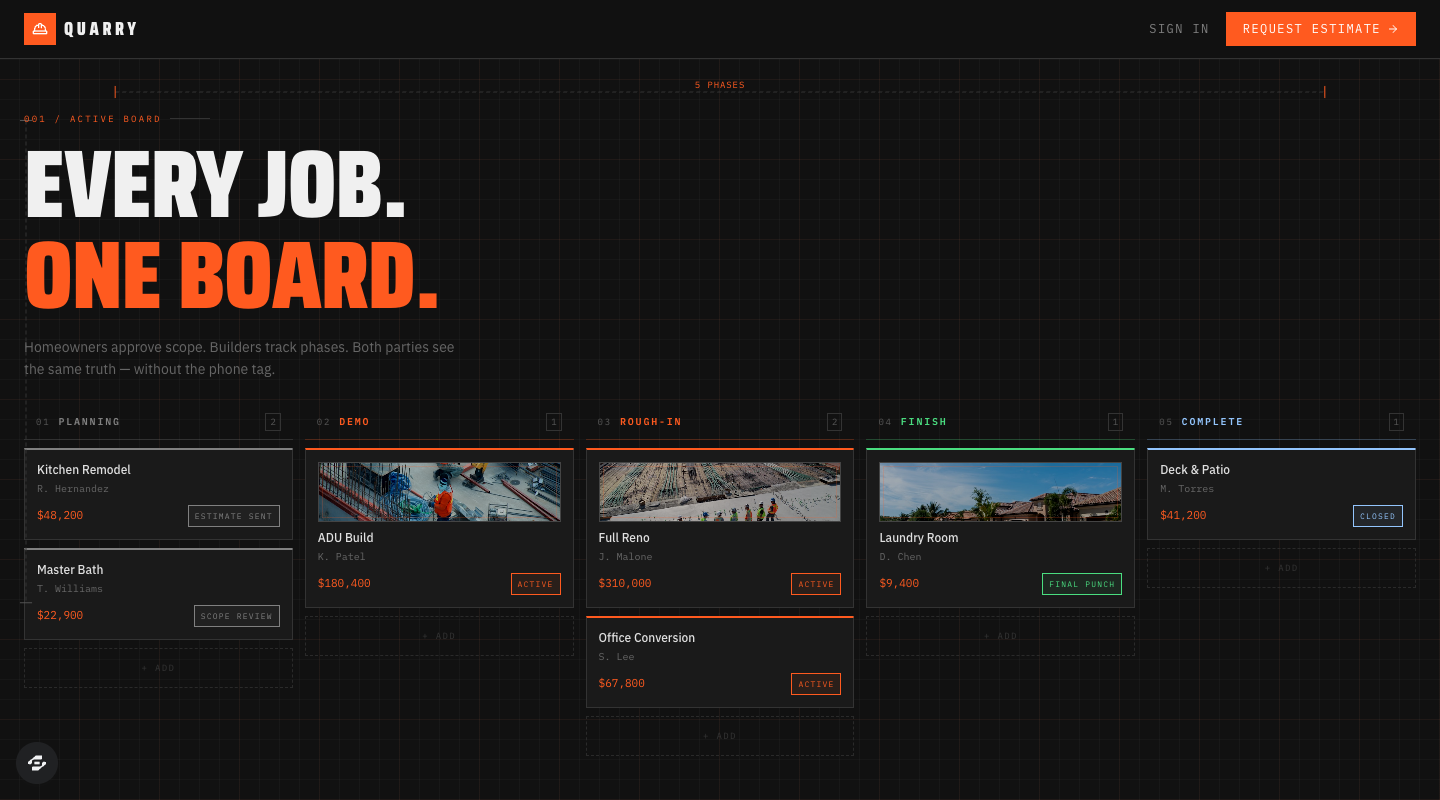
Quarry's public project board, captured September 8, 2026, with illustrative projects. The proposed decision log and revision handoff below are requirements to build and test, not verified features of this preview.
Preview captured · Open live preview · View full-size imageWhat to inspect
- Give the phase contextWrite what changed, when it changed and which project record the update describes.
- Name the next decisionShow the question, reference version, response owner, deadline and dependency together.
- Keep the historyPreserve the answer to the old version when a revised question needs another response.
The board is publicly viewable. The remix page continues through signup or sign-in; check your account access and credits before creating a copy. Current plans and credits.
Give each update one next action
Our example is Cedar Kitchen, a fictional renovation managed by Avery at Cedar Works for homeowner Rowan. The project is in Planning on October 6, 2026. Dates, people, choices and dependencies are illustrative planning data, not a construction schedule or a claim about a customer project.
Here is the client-facing update:
Cedar Kitchen · Planning
Updated October 6, 2026 at 9:00 AM, America/Chicago

What changed: Avery uploaded layout version 3. It puts the tall pantry
beside the refrigerator and leaves the window wall open.

Your next decision: Rowan, choose the pantry position shown in layout
version 3, or leave the specific change you want Avery to review.

Needed by: October 7 at noon, America/Chicago.
Why then: Avery plans to send the chosen layout for a cabinet quote
that afternoon. The quote request is waiting on this decision.

Decision owner: Rowan. Follow-up owner: Avery.
Reference: Layout version 3, decision D-01.
If you need more time: tell Avery in this decision's discussion.
Next update: October 7 at 3:00 PM, even if the decision is still open.
The next-update promise belongs to the contractor using this example. An app must not invent a cadence the team cannot maintain. Choose one your project lead can actually follow, and display when the last update was made.
Map phases to decisions before designing the dashboard
Walk through a recent project with the person who runs it. At each phase, identify a decision the homeowner makes and the event it blocks. The table below is a starting exercise; adapt the phases and dependencies to your own work.
Scroll horizontally to compare all columns.
| Phase | Useful homeowner-facing update | Example next decision | What waits for the answer |
|---|---|---|---|
| Planning | Current layout and what changed since the last version | Choose the pantry position | Requesting the cabinet quote |
| Demo | Progress photos and a clear description of a newly discovered condition | Respond to a documented scope proposal | Scheduling the proposed additional work |
| Rough-in | Current progress and the exact item needing review | Confirm a proposed visible outlet position | The team's review of that placement |
| Finish | Delivered selections and any item that differs from the agreed reference | Choose between the documented handle options | Ordering the selected handles |
| Complete | Remaining items, who owns each one and the next visit | Confirm which listed items still need attention | Preparing the next completion review |
This is a communication model. Your contractor must determine technical requirements, safe work sequencing and any formal approval process. The portal should record the real dependency the team supplies, rather than treating every homeowner response as permission to proceed with work.
Keep the decision log small enough to read
For the first version, use one row per decision and a detail view for its evidence and history. In the sample project, these three records are enough to show what is settled, what needs a reply and what is not ready to ask yet.
Scroll horizontally to compare all columns.
| Decision | State | Person who replies | Needed by, America/Chicago | Next action |
|---|---|---|---|---|
| D-01: Pantry position, layout v3 | Awaiting homeowner | Rowan | October 7, noon | Choose the shown position or request a change |
| D-02: Handle finish, selection sheet v2 | Answer recorded | Rowan | October 5, 4:00 PM | Avery verifies the selected item before ordering |
| D-03: Delivery access window | Preparing | Avery | No homeowner deadline yet | Avery obtains the supplier's available windows |
Keep the person's response separate from the team's follow-through. “Rowan selected brushed nickel” is a recorded answer. “Avery placed the handle order” is a different event with its own date and evidence. The first must not automatically claim the second happened.
For D-02, the detail view could read: “Rowan selected option B on October 5 at 2:10 PM against selection sheet v2. Avery still needs to verify availability.” If the choice changes the agreed scope or price, follow the business's existing documented change process. A casual portal reply should not silently become a signed change order, a payment authorization or a completed purchase.
Store the handoff behind the row
Give every decision a stable identifier, its project, current reference version, question, response owner, follow-up owner, deadline and state. Preserve the actual response, responding person and timestamp. Add a short explanation of the dependency and a place to record the team's next action.
Use a short state set with clear meanings:
- Preparing: the team is collecting the information needed to ask the question.
- Awaiting homeowner: the current question and reference are ready for a reply.
- Answer recorded: a response exists for that exact question and version; follow-through may remain.
- Closed: the responsible person has recorded the agreed follow-through or why it is no longer needed.
- Superseded: a newer question or reference replaces this one; retain the history.
“Overdue” can be a visible label derived from an unanswered decision's deadline. It should not erase the underlying state or imply the homeowner agreed by remaining silent. Show which person will follow up and let that person record a revised deadline with a reason.
Handle a changed drawing without losing the answer
Suppose Rowan answers D-01 against layout v3. Avery then uploads layout v4 with a different pantry position. The old answer remains attached to v3. It cannot be carried forward as approval of v4.
Keep D-01's history and mark the replaced question Superseded. Create D-04 for the v4 choice, link it to D-01, explain the change and set a fresh owner and deadline. The homeowner should see that another answer is needed and be able to open the earlier decision for context.
If Avery merely corrects a spelling error that changes no choice, the team can record that distinction under its own version policy. Decide that policy before building; an app cannot infer whether a drawing change is materially different just because its filename looks similar.
Rehearse the portal with the sample project
Use the filled worksheet as a short acceptance exercise. Have one person act as Rowan and another as Avery in an authorized test copy.
- Rowan opens Cedar Kitchen and can find D-01, layout v3, the deadline and Avery's next-update time.
- Rowan records an answer. Both people reopen the decision and see the same response, version, person and time.
- Avery records the follow-through separately. A response alone must not mark an order placed or work completed.
- Avery introduces v4 and D-04. D-01's answer remains in history, while the new question visibly needs a reply.
- An unanswered deadline passes. The decision remains open and names a follow-up owner; silence does not create an answer.
Record observed results beside those expectations. Then use the private-record access guide to test whether another client, an unassigned staff member or a signed-out visitor can open the project, attachments or decision history. The communication exercise does not establish those permissions.
Use Quarry as a starting point
Inspect Quarry's public project board and template page. Its phase columns give you an interface to discuss with a contractor. The sample board does not establish that the decision log, version handling or client permissions in this guide are already implemented.
Ask for a focused adaptation using your completed worksheet:
Adapt Quarry for a renovation contractor's homeowner updates.
Keep the project phase, then add one visible next homeowner decision.
Use my worksheet's question, reference version, response owner, deadline,
dependency, follow-up owner and next-update time.

Start with the fictional Cedar Kitchen project and D-01 through D-04.
Keep answers tied to the exact reference version. Preserve superseded
questions and their history. Record the team's follow-through separately.
An unanswered deadline must not become consent or completion.

Implement and test project membership before using real client records.
Use sample files. Do not send external messages, place orders or connect
payments. Report the rehearsal results and setup still required.
The Quarry remix page continues through signup or sign-in and account access. Review current plans and credits before creating a copy. Use the client-portal build guide for the underlying records and permissions, then invite the contractor to review one complete decision handoff before expanding the portal.