

Should your renovation business build a client portal?
A homeowner portal earns its place when it makes a recurring conversation easier: “Where are we, what changed, and what do you need from me?” Start with that view of one project. You can keep estimating, scheduling and accounting in the systems your team already uses.
For a small renovation business, the useful first version is often a current update, a reference the homeowner can open, and a decision they can answer. A whole-company project board helps a contractor manage work. A homeowner needs the part of that work that belongs to their project, written for them.
Scroll horizontally to compare all columns.
| What is difficult today? | A focused first version | Keep outside the first build |
|---|---|---|
| Homeowners ask for the latest update in several message threads | A read-only project page with its phase, last update and next update time | Replacing the team's scheduling or accounting system |
| A choice is waiting in someone's inbox | One decision with a named person, current reference and needed-by time | Treating a response as an order placed or work completed |
| Everyone has a different copy of the drawing | A current reference with a visible version and a history of replaced references | Inferring approval from a file being opened |
| The internal board contains information clients should not see | A separate homeowner view with explicit project membership | Exposing the full crew board and hiding a few columns in the browser |
| The business needs estimating, procurement, payroll and job costing together | Compare dedicated construction software against those requirements | Assuming a project-board template supplies the whole operating system |
Choose a custom build when your team can name the missing handoff, maintain the updates and test the result. If a shared project folder and a consistent update already solve the problem, start there. Include your team's maintenance time and any connected services when reviewing Overskill's current plans.
Separate the crew board from the homeowner view
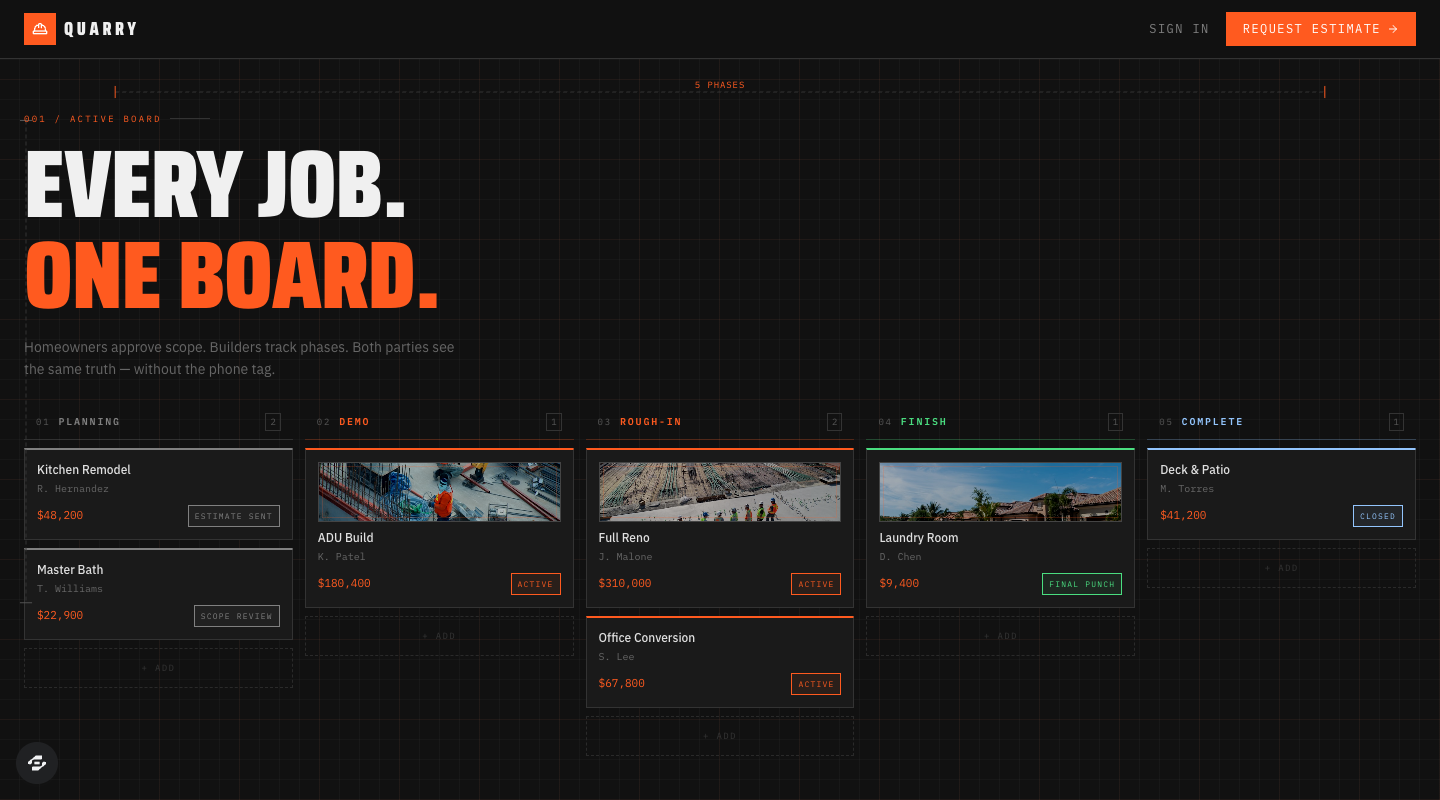
Quarry gives you a visible starting layout: project cards organized into Planning, Demo, Rough-in, Finish and Complete. Discuss those columns with your project lead. Use your own phases if the work follows a different sequence. The public example does not establish private client workspaces or the decision flow described here.
Before building, decide who writes each piece of information and who may read it. The following is a proposed boundary for your brief, not a permission model already verified in Quarry.
Scroll horizontally to compare all columns.
| Information | Homeowner view | Contractor workspace |
|---|---|---|
| Project phase and published update | Read the latest published version for their own project | Draft, review and publish the update |
| Next homeowner decision | Read the exact question and reference; submit their response | Name the response owner, deadline and follow-up owner |
| Current reference | Open a reference intentionally shared with their project | Add a new version and preserve the earlier one |
| Client-visible follow-up | See the owner and next update time | Record the action taken and its evidence |
| Crew discussion, supplier cost and other clients' projects | No access | Limit access to the staff who need it |
Keep draft updates out of the homeowner feed until the responsible person publishes them. Label when a published update was last changed. A blank phase or an old update should remain visibly incomplete rather than acquiring an invented progress percentage.
Give the homeowner one decision they can act on
Imagine the fictional Cedar Kitchen project. Its homeowner needs to choose a pantry position before the project lead requests a cabinet quote. A useful card names “Pantry position, layout version 3,” shows the two options, names the person who should reply and explains what waits for the answer.
If layout version 4 changes the choice, the earlier answer remains attached to version 3. Show the new question and explain why another response is needed. Keep the team's later action separate: an answer recorded is different from a quote requested, an order placed or a payment made.
Use the renovation-update worksheet to fill in one complete example. It supplies a current update, a decision log, a changed reference and the expected handoff. Adapt the question and ownership before asking a builder to add more screens. The worksheet and this page describe communication requirements; your existing documented process still governs scope changes and formal approvals.
A starting brief for your contractor portal
Open the Quarry template above to inspect it, or use the composer with a brief like this. Replace the example project and assign someone to maintain its updates.
Adapt Quarry into a homeowner portal for my renovation business. Start with fictional Cedar Kitchen and a second unrelated test project. Keep a contractor workspace and a separate homeowner view. Each homeowner sees only their own project's published phase, latest update, current reference and next decision. Staff prepare updates before publishing them. Decisions have a reference version, response owner, deadline, follow-up owner and response history. Keep crew notes private. A changed reference must not inherit an answer to the old version. Record follow-through separately from the homeowner's response. Start with sample files and no external messages or payments. Give me a checklist and observed results for saved records, project membership and the two-client handoff before inviting real homeowners.
Remixing continues through signup or sign-in and your account's access and credits. The preview can help you choose a starting interface; the configured copy needs its own acceptance checks. Use the client-portal build guide to turn the brief into records, screens and permissions.
Rehearse two projects before inviting a homeowner
Give one person a staff test account and two people separate homeowner accounts. Use invented names and sample files. Check the same project after leaving and returning so a successful click is followed by a saved result.
- Publish one update. Draft an update as staff. The assigned homeowner should see the published version, while the other homeowner sees none of that project.
- Open the reference directly. Test the attachment link as the assigned homeowner, the other homeowner and a signed-out visitor. Check the file itself, not only the button that opens it.
- Answer and return. Submit one response, leave, and reopen the decision as homeowner and staff. Verify the same person, answer, time and reference version.
- Change the reference. Replace version 3 with a materially different version 4. Preserve the old answer and show that the new question still needs a reply.
- Miss a deadline. Leave a decision unanswered. It should name the follow-up owner and remain open. Silence must not become an answer or permission to act.
The private-record access checks cover direct links and attempted changes as well as visible pages. If you later add notifications, payments or formal approval tools, specify the provider and verify its actual result before promising it to clients. Finish with the launch checklist and a phone review of the first homeowner journey.