

An owner should be able to correct a directory listing without putting every draft in front of visitors. Decide which revision is public, who can change that decision, and what happens when the owner withdraws the listing.
This Part 2 workflow exercise helps you plan a directory in Overskill. Work through five fictional listings, then leave with a publication policy, exact expected public records and a review card you can adapt. It is an alternative app recipe, not another required chapter in the other example apps.
Download the worked review worksheet and Download the fictional dataset. The records and checks are illustrative; no live moderation, permission or cache behavior is claimed.
Keep the listing separate from its revisions
Each listing has a stable ID. Each proposed change has a new, immutable revision ID. The owner can draft and submit a revision; a reviewer decides exactly which submitted revision is approved.
The example keeps three questions separate:
| Question | Example states |
|---|---|
| Is this listing still participating? | Active or withdrawn |
| Does its identity need a decision? | Clear or held |
| What happened to this revision? | Draft, submitted, approved or rejected |
An approval chooses which version visitors see. It does not clear an identity hold or reactivate a withdrawal. Only the latest submitted revision can receive a new decision; a newer draft alone does not replace the submitted one.
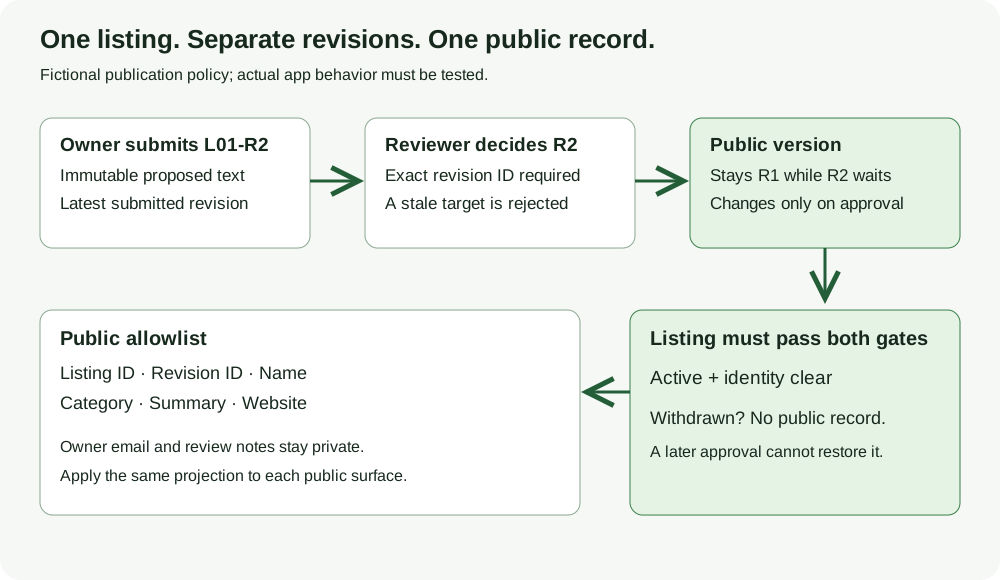
A proposed publication policy for the fictional directory. The diagram does not establish server permissions, cache removal or a working moderation feature.
Open full-size imageKeep an approved listing visible while edits wait
L01, the fictional Cedar Print listing, first publishes revision L01-R1. Its website is https://business01.example/. The owner then submits L01-R2 with a different website.
At that point the owner has a pending edit, but visitors still see R1. This exercise deliberately keeps the last approved revision public during review. It also keeps R1 public if the reviewer rejects R2. Choose that policy explicitly rather than letting a generic “status” field decide it accidentally.
A new approval request targeting R1 after R2 was submitted is stale. It cannot approve the newest text by implication. The rejection of R2 records a private reason; the owner creates R3 with the corrected website and submits it. Approving R3 then changes the public listing to https://business01.example/order and the revised description.
Withdraw the whole listing
L03, Quarry Frames, already has an approved revision when its owner submits another edit. The owner then withdraws the listing.
The expected public result is no L03 record, even though its newer revision remains in the private history awaiting a decision. A later approval attempt cannot put it back. This small policy has no restore action; restoring a withdrawn listing would need its own explicit rule.
Verify withdrawal on your own detail, list, search and export surfaces. The offline answer key does not prove that caches expire correctly or remove copies a visitor already saved. Those need separate observations in the app you build.
Publish an allowlist, not the owner record
Every public record in this example contains only six fields: listing ID, revision ID, name, category, summary and website. Owner emails, draft notes, rejection reasons and identity-review notes stay private.
The worksheet includes reserved fictional addresses so you can look for an accidental leak without using customer data. Its download is setup material, including synthetic private fields; it does not enforce permissions itself. Use the private-access worksheet for a broader account and copied-link test.
L04 also uses the name Cedar Print. It stays held until a reviewer makes an explicit identity decision. The exercise assumes the reviewer establishes that it is a distinct member; no real identity check is claimed. L01 and L04 keep separate IDs and records throughout. Matching names alone are not permission to merge businesses.
Check every public snapshot
The worksheet lists all 22 attempted actions and the expected public revisions after each one. An exact replay of an accepted action ID changes nothing. Reusing that ID with different content returns a conflict and must not become another approval.
At the end, the fixture has five listings and eight revisions. Four revisions have historical approval decisions, but only two listings are public: L01-R3 and L04-R1. L02 still awaits its first approval, L03 is withdrawn, and L05 was never submitted. Counting approved revision rows would give the wrong directory total.
Use the blank card to record the current approved value, proposed value, exact decision target, actor and evidence. Leave actual outcomes as Not tested until you perform the action. Record failures and repairs separately so a retest does not erase the earlier result.
Turn the policy into an Overskill brief
The marketplace builder is the existing Overskill entry for directories and provider listings. Its starter list can include general examples; this guide does not recommend a verified moderation template.
Use this directory's build brief to start with the publication rules and separate visitor, owner and reviewer permissions. Edit the fields for your directory, then choose Start build. You can also copy the worksheet's complete starting brief into the marketplace builder. Neither link attaches or imports the example dataset. Supply your fictional setup and expected snapshots separately, and keep real private contact data out of the starter prompt. Your account's normal access and credit requirements apply when building.
Start with owner edits, revision-specific review and the public projection. Test those with two owners, a reviewer and a signed-out visitor before adding payments, reviews or booking flows. Use the app launch checklist when that first journey works.