

A folder of downloaded files is useful only if you can recover the information your business needs from it. Pick one appointment and try to explain who it belongs to, who is responsible, what was agreed and what changed. A row count alone cannot answer those questions.
This is a Part 4 check for an app you are building in Overskill. You will produce a reconstruction record and a list of unresolved gaps before relying on an export. Download the reconstruction worksheet and download the four example packages. All records are fictional. These are authored CSVs and text attachments, not captured Overskill exports or evidence of a successful restore.
Rebuild one appointment from its IDs
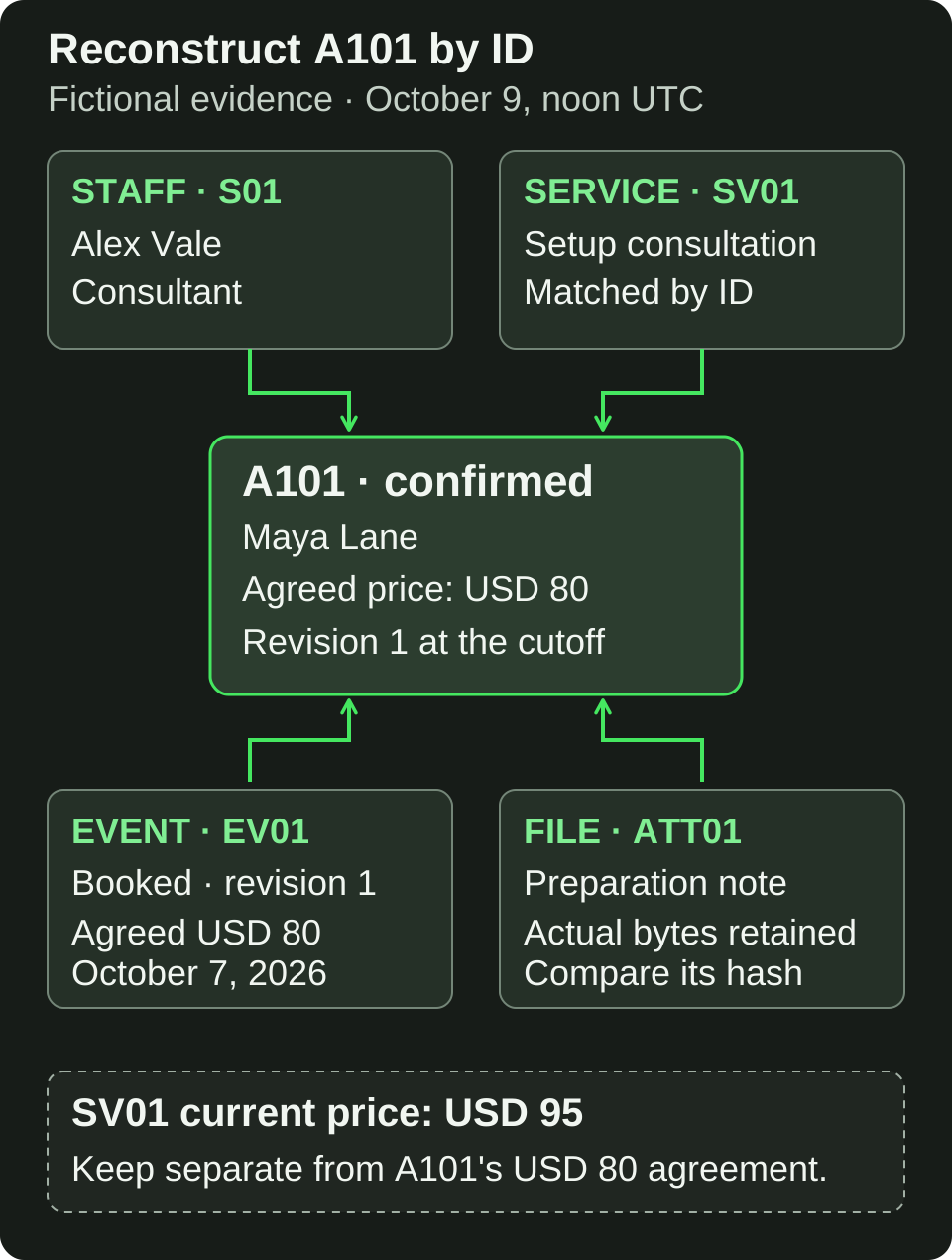
Follow IDs and retained evidence to reconstruct the fictional appointment. A later list price does not replace the original agreement.
Open full-size imageOpen A-complete and start with appointment A101. Follow its staff and service IDs instead of matching display names. In this example, two staff members are both called Alex Vale; only S01 is assigned to A101.
Scroll horizontally to compare all columns.
| Question | Retained evidence | Reconstructed answer |
|---|---|---|
| Who and when? | A101 in appointments.csv
|
Maya Lane, October 10, 2026 at 14:00 UTC |
| Which staff member? | A101 → S01 in staff.csv
|
Alex Vale, consultant; not S02, the technician |
| What service? | A101 → SV01 in services.csv
|
Setup consultation |
| What was agreed? | A101 and its booking event EV01 | USD 80.00, recorded as 8000 cents |
| What is its state? | A101 revision 1 and EV01 | Confirmed at the example's October 9, noon UTC cutoff |
| Is its attachment retained? | ATT01 and its local file | The preparation note exists and matches the listed bytes and hash |
The current service list says USD 95.00, effective October 9. That does not rewrite the USD 80.00 agreed when A101 was booked. Keep the agreement with the appointment and preserve the later list price as a different fact.
Now check A102. Its history contains a booking and a later cancellation at October 9, 11:00 UTC. The cancelled appointment retains the original USD 80.00 agreement and a recorded USD 20.00 cancellation charge. These files contain no payment or refund evidence; do not describe the charge as money collected.
Find what each broken package cannot tell you
The complete exercise has five CSV tables, thirteen data rows and two retained attachments. Its three variants each expose a different gap. Inspect them separately; do not copy missing facts from the complete example.
Scroll horizontally to compare all columns.
| Package | What you can establish | What must remain unresolved |
|---|---|---|
| B: Missing staff | A101 and A102 still reference S01; the staff file contains only S02. | S01's name and role cannot be recovered from this package. A shared name does not make S02 a substitute. |
| C: Missing attachment | ATT01 still has a URL, local path and expected hash. | A101's preparation file is absent. A URL and a hash do not recover its contents. |
| D: Mixed snapshots | A102 is confirmed in a 10:30 UTC appointment file; a noon event file contains its 11:00 cancellation. | A coherent noon state for A102 needs a matching capture or an explanation of the change. A101 can still be reconstructed, but that does not resolve A102. |
Different capture times are a reason to check, not automatic proof of an error. Package D has a specific contradiction: the later cancellation is missing from the earlier appointment state. Preserve both observations. Do not silently edit the row or assume a restore tool will reconcile it.
Check the retained files, then record the limits
Each package has a manifest listing expected files, capture times, row counts, byte lengths and SHA-256 hashes. Case C intentionally fails one expected-file check. For a real export, compare the files with your intended scope and an appropriate source record; do not assume the example's inventory fits your app.
Open the retained attachments. A matching hash tells you the bytes agree with the reference you used; it does not establish that the reference is trustworthy or that every required file was included. Keep exported personal information and attachments in an appropriately restricted location.
Write down the appointment you recovered, the files used and the exact unknowns. “S01 is absent” is useful. “Probably Alex” hides the problem. The worksheet includes a blank record so someone else can repeat your check.
Continue in Overskill
For an existing app, use Exporting your data for the current export instructions, then inspect what you actually receive. The help describes per-table CSV downloads and a separate code ZIP action. This exercise does not verify an export from your account, an atomic snapshot, a backup schedule or a working migration.
For an app you are planning, open the app brief builder. Specify the IDs, agreed prices, change history and attachments you need to reconstruct, plus who may export them. Review the generated brief, edit its input fields and choose Start build. The link imports no files and performs no export; normal account access and credits apply when building.
Use the spreadsheet mapping guide for incoming data and the launch checklist for the wider app test. An offline reconstruction is one useful check, not a platform backup or restore guarantee.